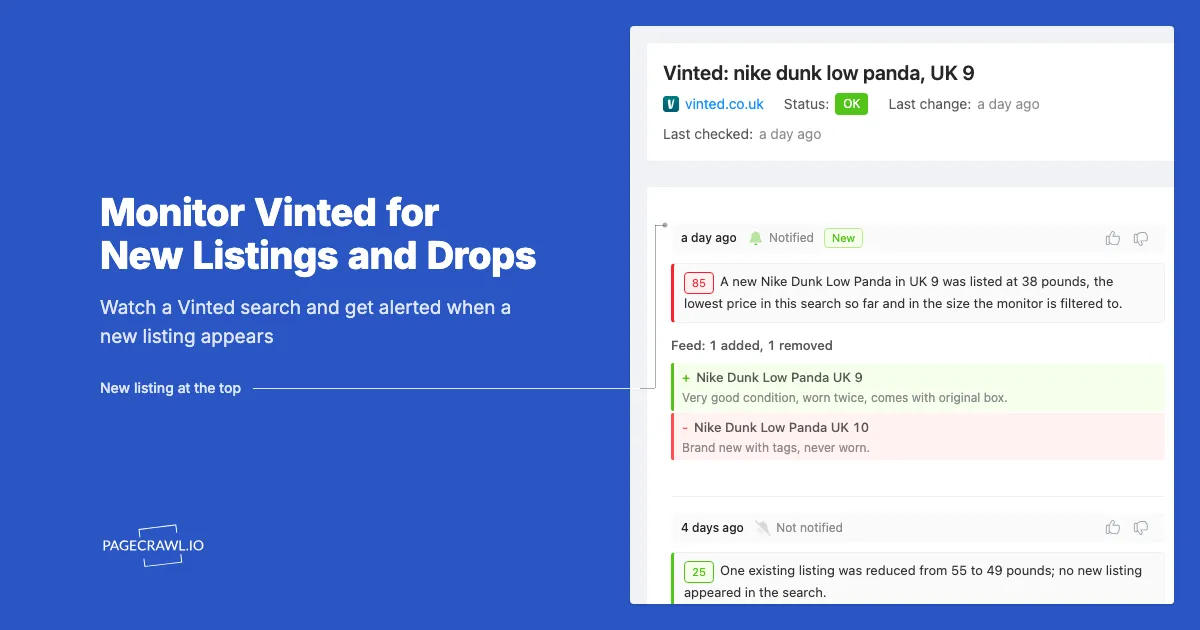
A pair of Nike Dunk Low Panda in a UK 9 goes up on Vinted at 7:40 in the evening for 38 pounds. By 8:15 it is sold. You searched for exactly that shoe at lunchtime and again the next morning, and never saw it. On Vinted, the good listings do not wait for you.
Vinted is a peer-to-peer marketplace. There is no warehouse and no restock: every listing is a single item from a single seller, priced by that seller, and gone as soon as one buyer taps Buy. The only way to get the good ones is to see them before everyone else does, and the only way to do that reliably is to have something check the search for you.
This guide explains which Vinted pages are worth monitoring and how to set up a monitor that reports new listings, price drops and sold items on vinted.co.uk, vinted.lt, vinted.com and every other Vinted country site.
Why do the best Vinted listings disappear so fast?
Vinted listings sell quickly because each one is a single item, most are priced below retail, and thousands of buyers watch the same searches. A well-priced item in a common size can sell within minutes of being listed. Refreshing a search by hand catches the leftovers, not the bargains.
Three things work against a manual search:
- Sellers list at odd hours. Most listings appear in the evening and at weekends, when people photograph their wardrobes. A lunchtime search misses them.
- Relevance ranking hides new items. Search results rank listings by how well they match your query, not by when they were listed. A fresh listing can sit on page four.
- The window is short. For popular brands and sizes the gap between "listed" and "sold" is often shorter than the gap between two of your visits.
Vinted's own app offers saved searches and lets you favourite items, and those are useful. A monitor adds two things on top: it watches on a fixed schedule instead of when you happen to open the app, and it reads every new listing against a description of what you want before it alerts you, so you hear about the listings that matter and not the rest.
Which Vinted pages can you monitor?
You can monitor three kinds of Vinted page, and each answers a different question. A search or catalog page tells you when a new listing appears. A brand page does the same for one brand. A single listing tells you when its price changes or it sells. Pick the page that matches the question you actually have.
Search and catalog pages: new listings
This is the page you get after typing a query and applying filters, for example a search for "nike dunk" narrowed to women's trainers in one size and a price ceiling. Every filter you set on the site ends up in the URL, so the URL you copy from the address bar is the exact search you were looking at. The monitor tracks the list of items on that page and reports the ones that were not there on the previous check.
Brand pages: everything new from one brand
Vinted has a page per brand. Monitoring it reports every new listing for that brand, which is broad, so combine it with the site's category and size filters, or tell the monitor in plain English which models you want so only those trigger an alert.
A single listing: price drops and sold
A listing page shows one item, its price and whether it is still available. Monitoring it tells you when the seller lowers the price and when the item is sold or reserved. This is the page to watch when you have found the item but the price is not quite right yet.
How do you set up a Vinted new-listing alert in PageCrawl?
Set up a Vinted alert by building the search on Vinted, copying the URL from the address bar, and pasting it into a new PageCrawl monitor. PageCrawl recognises Vinted catalog, search and brand pages, switches to list tracking on its own and reads the listings straight from the results. Then describe what you are after, pick a check frequency and save.
The tool at the top of this page does the same job: paste a search URL and describe what you want, or paste one listing and watch its price. The steps below are the same setup inside PageCrawl.
1. Build the search on Vinted
Go to Vinted and search for what you want. Apply every filter you would use by hand: category, brand, size, condition, colour and a price range. The narrower the search, the fewer alerts you will get and the more useful each one will be.
2. Copy the URL
Once the results look right, copy the whole URL from the address bar. Every filter you applied is part of it, so the monitor watches exactly the search you were looking at. There is nothing else to configure on Vinted's side.
3. Paste the URL into a new monitor
Sign up at PageCrawl.io or open your account, click to add a new page and paste the URL. PageCrawl switches to feed tracking, which treats the results as a list of listings rather than one block of text, and shows you the listings it found. Seller promotions and other blocks that rotate around the results are left out, so only real listings count. Each listing is tracked by its title, price and link, so a new one is reported as one new item rather than as a wall of changed text.
If the preview shows the listings you expect, you are done with the hard part. If it shows only one or two items because the search is very narrow, click one of the listings in the preview to point PageCrawl at the list.
4. Tell PageCrawl what you are after
Under What should we alert you about?, describe the listing you want in plain English, the way you would brief a friend who is watching the search for you. For example:
Alert me about Nike Dunk Low Panda in UK 9 or 9.5, under 45 pounds, in good condition or better. Ignore kids' sizes, customs, replicas and listings without box photos.
Every time a new listing appears, the AI reads it against that description and only sends an alert when it fits. Sizes written three different ways, a model name buried in the description, "brand new" versus "worn twice", a price that includes buyer protection: the AI reads all of it the way you would, which is exactly where word lists fall down. Leave the box empty to be told about every new listing in the search. The AI change detection guide covers how the scoring works and what the included AI credits cover.
This stacks with the search filters. A common pattern is a broad brand search on Vinted with a description in PageCrawl of the two or three models you actually want, in your size, at your price.
5. Choose a check frequency and save
Pick how often the search should be checked. Alerts arrive when the next check finds a new listing, so the interval sets how fresh your alerts are. Hourly works for slow categories such as furniture or vintage pieces. For popular trainers, designer bags and in-demand sizes, use the shortest interval your plan allows; paid plans check as often as every 2 minutes. Save the monitor and PageCrawl runs a first check to record the current listings as the baseline. From then on you are told only about listings that appear after it.
Choose where alerts go under notifications: email, Slack, Telegram, Discord, push or a webhook. Telegram and push are the ones to pick if you plan to act within minutes.
How do you track a single Vinted listing for a price drop?
To track one listing, paste its URL, the one that contains /items/, into a new PageCrawl monitor. PageCrawl recognises a Vinted listing page and tracks the price as a number, together with whether the item is still available, so a price drop and a sale are both reported as a change in that value.
A few things to know:
- Set a target price. Under notification conditions, choose to be alerted when the price is below the number you have in mind. Until the seller drops to that level you hear nothing.
- Sold and reserved are reported too. When the item sells, the availability value flips and you get a change, so you can stop waiting and move on.
- Watch several at once. If you are choosing between five similar listings, monitor all five with the same target price. The first to drop below it is the one to buy. Use a folder or label to keep them together.
Vinted also lets you favourite an item and tells you when its price drops. A monitor is useful when you want a price threshold rather than any drop, when you want the alert in Slack or Telegram instead of the app, or when you want the sold state recorded alongside the price history.
Does this work on vinted.lt, vinted.de and the other country sites?
Yes. Vinted runs a separate site per country, such as vinted.co.uk, vinted.lt, vinted.de, vinted.fr, vinted.pl and vinted.com, and they all share the same page layout and the same URL parameters. PageCrawl applies the same recognition, the same listing tracking and the same price tracking on every one of them.
Two practical notes:
- Monitor the country site you can buy from. Listings on vinted.lt are sold in euros to buyers who can receive shipping there. A bargain on a site you cannot order from is not a bargain.
- Currency follows the site. Price tracking reads the currency the page shows, so a target price on vinted.co.uk is in pounds and on vinted.de in euros. Set the threshold in the right currency.
What can you use Vinted alerts for?
Vinted alerts suit anyone who wants a specific item at a specific price and does not want to refresh the app all day. The most common uses are hunting for one item, reselling, kitting out children who outgrow clothes every season, and collecting.
Finding one item
You know the brand, model and size. Build the search with every filter and set a price ceiling in the monitor. Then forget about it until the alert comes.
Reselling
Resellers monitor broad brand searches to catch under-priced listings from sellers who did not check what an item is worth. A description such as "alert me when a listing is priced well below the usual resale value for this model, in any adult size" keeps the alert volume down, and a short check interval matters more here than anywhere else.
Children's clothes and gear
Kids' sizes are the fastest-moving category on Vinted and the one where a monitor pays off most. Search by size and a short list of brands, and let the alerts do the browsing.
Collecting
Vintage pieces, discontinued lines, band merchandise and limited releases surface on Vinted irregularly and often from sellers who list a whole wardrobe at once. A monitor on the search term, told to ignore reproductions and reissues, is the only practical way to keep watch over months.
Tips for fewer, better alerts
- Narrow on Vinted, then describe the rest in PageCrawl. Use the site's filters for category, size and price, and let the description handle the exact models, condition and anything else a filter cannot express. Broad searches with no description produce dozens of alerts a day.
- Say what to ignore. A line such as "ignore replicas, damaged items, customs and kids' sizes" in the description removes most false hits.
- Use a digest for slow categories. For furniture, books or vintage pieces, a daily digest is easier to read than one email per listing. Keep real-time alerts for the fast categories.
- Review the first week. Look at what the monitor reported and sharpen the description. A monitor that alerts on the right two listings a week is worth more than one that alerts on twenty.
Getting started
Build the search on Vinted, copy the URL and paste it into a new PageCrawl monitor. Describe the listing you want in a sentence or two, pick a check interval that matches how fast the category moves, and choose where the alerts should arrive. You can set up a Vinted search or listing monitor on the free plan and add more as you find searches worth watching.