Theo drives the same 340-mile round trip to his sister's place once a month, and he has the charging stops memorised: one DC fast charger at the halfway service plaza, one top-up before the return leg. For two years the trip cost him roughly the same amount every time, close enough that he stopped checking. Then in March the card statement came back about a third higher. No email had arrived. No banner had appeared in the app. The network had simply published a new per-kWh rate on its pricing page, and Theo discovered it two charging sessions after the fact.
That is the part that stings. Fuel prices are printed on eight-foot signs at the roadside, so a rise is impossible to miss. EV charging prices live on a web page, in an app screen, and on a small display at the stall, and the version that changes first is almost always the web page. Networks revise per-kWh rates, add or restructure session fees, shift the boundaries of time-of-use windows, change what an idle fee costs per minute, and quietly reprice the monthly membership that was the whole reason you picked that network. Each of those changes is a change to a public URL. None of them come with a phone call.
The drivers who never get surprised are not reading press releases. They are watching a handful of official pricing pages and letting a monitor tell them when the numbers move. This guide covers what actually changes on charging network pricing pages, why idle and congestion fees deserve their own attention, how to work out whether a membership still pays for itself after a repricing, and how to set up alerts that catch the change on the next check instead of on your next statement.
Why do EV charging prices change without warning?
Charging networks reprice because their own input costs move, and they are under no obligation to announce it. Electricity wholesale rates, utility demand charges, site host agreements, and competitive positioning all shift, and the network updates its pricing page to match. There is no regulated roadside sign, so the web page is the announcement.
The pricing page is the only public record
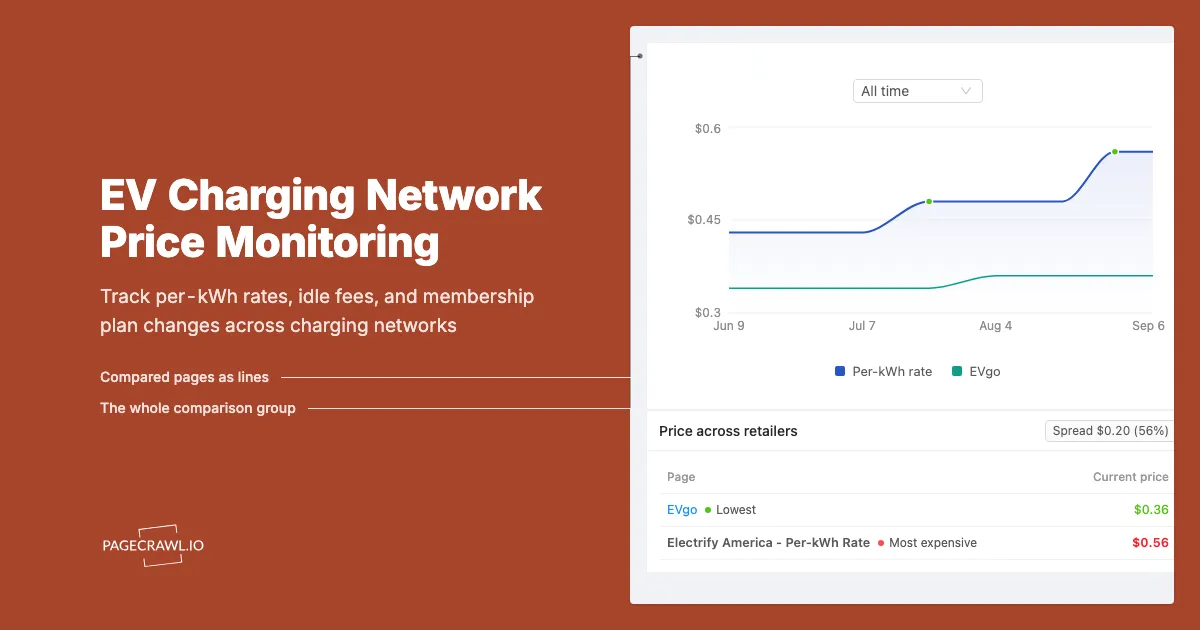
A petrol station has to display its price to the street. A DC fast charging network publishes a rate on its website, mirrors it in the app, and shows it on the stall screen before a session starts. That means the practical public record of what a network charges is a URL. Electrify America publishes its plan and per-kWh pricing on a dedicated pricing page, and EVgo does the same for its plans and time-of-use rates. When those pages change, the price changed. Nothing else needs to happen for the new number to hit your card on the next session.
Per-minute and per-kWh billing are not interchangeable
Some networks bill per kilowatt-hour, some bill per minute, and some do both depending on the state, because per-kWh sales of electricity are regulated differently in different jurisdictions. EVgo has documented its shift toward kilowatt-hour pricing across more of its network, with time-of-use periods where the rate depends on the hour you plug in. A switch from per-minute to per-kWh billing is not a price cut or a price rise on its own, but it changes who wins and who loses: a slow-charging car does much better on per-kWh, a fast-charging car often did better on per-minute. That structural change is invisible in a single headline number and very visible in a page diff.
Time-of-use windows move quietly
When a network uses time-of-use pricing, the boundaries between off-peak, on-peak, and overnight rates are part of the price. Shifting an on-peak window an hour earlier costs some drivers real money without any advertised rate changing at all. Window boundaries are exactly the kind of detail that gets edited on a pricing page with no announcement, and exactly the kind of detail a text diff catches perfectly. If you charge on a routine, the schedule matters as much as the rate.
What should you monitor across charging networks?
Monitor three page types per network: the public pricing or rates page, the membership plan comparison, and the fees or support page that defines idle, congestion, and session charges. Together those three cover almost every change that shows up on a driver's statement.
Network pricing and rates pages
This is the primary monitor and, for a single-network driver, often the only one needed. Start with the official page for each network you actually use. Tesla's Supercharger information pages cover network policy and fee structure, Electrify America's pricing page covers per-kWh rates and plan tiers, and EVgo's pricing page covers plans and time-of-use structure. Track each one for text changes and you catch a repricing on the next check after it publishes.
Membership and plan comparison pages
Charging memberships are subscriptions, and subscriptions get repriced, restructured, and retired. A plan page change can mean a higher monthly fee, a smaller per-kWh discount, a new tier that makes your old one worse value, or a benefit quietly dropped. Watch the plan comparison page separately from the rates page, because networks frequently update one without touching the other. A membership is a recurring charge like any other, and the pattern of quiet revision is the same.
Idle, congestion, and session fee pages
Fees that are not per-kWh are where budgets break. Idle fees bill you per minute for occupying a stall after your session ends, and Tesla has also introduced congestion fees that bill per minute while charging above a high state of charge at busy sites. Both are defined in support documentation rather than on the headline pricing page, and both can be revised without touching the advertised rate. If you road trip, this page type deserves a monitor of its own.
How much do idle and congestion fees actually cost?
Idle and congestion fees are billed per minute, so they scale with inattention rather than with energy. Public reporting on Tesla's congestion fee has described a rate of $1 per minute applying once a vehicle passes a high state of charge at busy sites, with idle fees kicking in after a session ends. Per-minute billing turns a coffee run into a real charge.
Why per-minute fees punish habits, not distance
A per-kWh rate is proportional to how far you drive. A per-minute fee is proportional to how distracted you are. Leaving a car plugged in for twenty minutes after it finishes costs the same whether you added 10 kWh or 60 kWh. That is deliberate, because the fee exists to free the stall rather than to sell electricity, but it means the cost lands hardest on exactly the trips where you have somewhere else to be. Drivers who plan around a fixed per-kWh budget and then get billed for dwell time are the ones who see the biggest gap between expected and actual cost.
Grace periods and thresholds are the fine print worth watching
The number that gets quoted is the per-minute rate. The numbers that determine whether you ever pay it are the grace period and the trigger threshold: how many minutes you have to move the car, how full the site has to be, and what state of charge activates a congestion fee. Networks adjust these details in support documentation, and the adjustment can matter more than the headline rate. A grace period shortened from five minutes to two is a price rise for anyone who walks inside for a drink.
Are charging memberships still worth it after a price change?
A membership pays off when the monthly fee is smaller than the discount you actually earn, and every repricing moves that break-even. When a network raises its subscription fee or narrows the member discount, the number of sessions you need per month to come out ahead goes up, sometimes past what you actually drive.
Working out your break-even
The arithmetic is simple once you have the four current numbers: the member rate, the non-member rate, the monthly fee, and your typical energy per session. Divide the monthly fee by the per-kWh saving to get the kilowatt-hours you must buy each month before the membership is free. Divide that by your usual session size to get sessions per month.
| Input | Where to find it | Why it moves |
|---|---|---|
| Member per-kWh rate | Network pricing page | Wholesale power costs, competitive repricing |
| Non-member per-kWh rate | Network pricing page | Often repriced independently of the member rate |
| Monthly membership fee | Plan comparison page | Subscription repricing, new tier structure |
| Session or connection fee | Fees or terms page | Added, removed, or scoped to certain plans |
| Typical kWh per session | Your own charging history | Changes with car, route, and weather |
The point of the table is that four of the five inputs live on pages a monitor can watch. When any of them changes, your break-even changes, and you should recalculate rather than assume the plan you chose last year is still the right one.
The discount can shrink without the fee rising
The most common quiet change is not a higher monthly fee. It is a smaller gap between the member and non-member rate. If both rates rise but the non-member rate rises less, your discount narrowed and your membership got worse value while every headline stayed technically accurate. This is why watching a single number is not enough. Track the whole pricing page so the relationship between the numbers is visible in the diff.
Promotional free charging always ends
Included charging bundled with a new vehicle, retail partner free sessions, and introductory member offers all have end dates, and those end dates are published rather than mailed. When the promotion lapses, sessions that cost nothing start costing full rate, which reads on a statement exactly like a price rise. Monitoring the promotions or offers page tells you the expiry is coming while you still have time to plan around it or switch networks for that trip.
How do you set up EV charging price alerts with PageCrawl?
You add each network's pricing page as a monitor, pick a tracking mode that reads the rate text, set a check frequency that matches how often prices realistically move, route alerts to a channel you actually read, and add keyword or threshold rules so only meaningful changes reach you.
Collect the URLs you actually use. Open the pricing page, the plan comparison page, and the fees or support article for every network you charge on. For most drivers that is two or three networks and five or six URLs total, comfortably inside the free plan's 6 monitors. Copy each URL exactly as it appears, including any regional path.
Add each URL to PageCrawl as a separate monitor. One page per monitor keeps the alerts readable. Name them clearly, for example "Network A - per-kWh rates" and "Network A - plan comparison", so the notification subject alone tells you what moved before you open anything.
Pick the tracking mode that fits the page. For a page dominated by a rate table, content or text tracking catches every changed figure. For a long policy or support article about idle and congestion fees, reader mode strips the navigation and watches the prose. If you only care about one specific figure, a number monitor on that value gives you the cleanest signal and lets you set a threshold.
Set the check frequency to match the page. Charging rates do not move every hour. Daily checking is genuinely adequate for a pricing page, and the free plan's 60-minute checks are already far faster than you need. Where higher frequency earns its keep is breadth: paid plans let you watch every network, every plan page, and every fee document at once rather than choosing three URLs.
Choose your notification channels. PageCrawl can send alerts by email, Slack, Discord, Microsoft Teams, Telegram, and outbound webhooks. For personal charging costs, email or Telegram is usually right, since you want to read the diff properly rather than glance at it. If you manage a fleet, a shared Slack or Teams channel puts the change in front of whoever approves the expense.
Add keyword and threshold rules so only real changes ping you. Set a number threshold so a rate has to move by a meaningful amount before you hear about it, and add keyword conditions on terms like "idle fee", "per kWh", "membership", or "session fee" so an unrelated marketing edit stays silent. Our guide to conditional alerts using price, keyword, and threshold rules walks through the exact setup.
Turn on screenshot capture. A pricing page screenshot attached to the alert gives you a dated visual record of what the network published. If you ever need to query a charge, having the page as it read on the day you charged is worth considerably more than a memory of the number.
Group the monitors in a folder. Put every charging monitor in one folder named something like "EV charging costs". When you review it monthly, you get the full picture of what every network you use has changed, in one place, instead of scattered emails.
Note: a monitor tells you the published rate changed. It does not replace checking the app or the stall display before a session, because per-site pricing can differ from the headline. The monitor is what stops a structural change from going unnoticed for two months.
What makes charging network pages hard to monitor?
The main difficulties are pages that render their rates dynamically, promotional banners and location widgets that change constantly without meaning anything, and per-site pricing that never appears on the public page at all. Each has a straightforward answer once you know to expect it.
Dynamic and app-first pricing
Some networks treat the web page as marketing and the app as the source of truth, showing only representative rates online. Where that is the case, monitor the plan structure, the fee definitions, and the terms rather than chasing a live per-kWh figure that the page never really commits to. Structural changes are the ones that affect every session anyway, and they are always published.
Noise from banners, maps, and station counters
Charging network pages carry rotating promotional banners, live station-count widgets, nearby-location maps, and news carousels. Left alone, those trigger alerts that have nothing to do with pricing. Restrict the monitor to the pricing region of the page, or mark the noisy areas to be ignored after the first false alert. Our guide to reducing monitoring false positives covers how to train a monitor to stay quiet about the parts of a page that change without meaning anything.
Regional and per-site variation
A national pricing page may not reflect what your local stall charges, because rates are set per site and per state. Treat the national page as your early warning that something changed at the policy level, then confirm the specific stall in the app. If you consistently use two or three specific locations, check whether the network publishes location-level pricing pages, and monitor those directly when it does.
Knowing where the stations are in the first place
Pricing only matters for chargers you can reach. The US Department of Energy's Alternative Fuels Data Center station locator is the authoritative public inventory of charging stations, useful both for planning a route and for sanity-checking which networks are worth monitoring for the roads you actually drive. Monitoring a network you never use is just noise.
How do you build a complete EV charging cost watchlist?
Tier your monitors by how much money each page controls. Tier 1 is the pricing page of the network you use most. Tier 2 is plan and fee pages for that network plus pricing for your secondary networks. Tier 3 is home electricity rates and promotional pages, checked at a relaxed pace.
Start with the network that takes most of your money
Look at three months of charging charges and find the network with the largest total. That network's pricing page is your first and most valuable monitor, because a change there moves more of your annual cost than everything else combined. Get that one working and generating clean alerts before you add anything else. A single well-tuned monitor you trust beats six noisy ones you learn to ignore.
Do not forget home charging
For most EV drivers, the majority of kilowatt-hours come from home, so the electricity tariff is the biggest single line in the charging budget even though public charging feels more expensive per session. A supplier rate rise or a change to an off-peak window can outweigh anything a charging network does. Our guide to monitoring electricity tariff and rate changes covers unit rates, standing charges, and time-of-use windows, and it pairs naturally with this watchlist.
Compare against the fuel you replaced
If you want to know whether the switch is still paying off, watch the comparison rather than just one side of it. Public charging rates and pump prices both move, and the gap between them is the number that actually answers the question. Our guide to monitoring gas and fuel prices covers the other half of that comparison, so you can see both trends against each other rather than guessing.
Choosing your PageCrawl plan
PageCrawl's Free plan lets you monitor 6 pages with 220 checks per month, which is enough to validate the approach on your most critical pages. Most teams graduate to a paid plan once they see the value.
| Plan | Price | Pages | Checks / month | Frequency |
|---|---|---|---|---|
| Free | $0 | 6 | 220 | every 60 min |
| Standard | $8/mo or $80/yr | 100 | 15,000 | every 15 min |
| Enterprise | $30/mo or $300/yr | 500 | 100,000 | every 5 min |
| Ultimate | $99/mo or $999/yr | 1,000 | 100,000 | every 2 min |
Annual billing saves two months across every paid tier. Enterprise and Ultimate scale up to 100x if you need thousands of pages or multi-team access.
If monitoring helps you land one sold-out concert ticket pair, one limited sneaker drop, or one in-demand product at retail instead of resale, Standard at $80/year is already paid for. 100 monitored pages covers every major retailer you care about, and the 15-minute check frequency catches most drops the moment they go live.
Getting Started
Open the pricing page of the charging network that takes the largest share of your charging spend and add it as a single monitor with daily checking and email alerts. That one page controls more of your annual cost than any other URL you could watch, and it takes about two minutes to set up.
Once the first alert arrives and you can see exactly which figure moved, add the plan comparison page and the idle fee documentation for the same network, then repeat for your fallback network. Group all of them in a folder called "EV charging costs" and add your home electricity tariff page alongside them, because that is where most of your kilowatt-hours come from.
Then run the break-even arithmetic once, with today's numbers, and write it down. The next time an alert says the member rate or the monthly fee moved, you will know in under a minute whether your plan still pays for itself.
Stop finding out about charging price rises from your card statement. Let the pricing page tell you first.