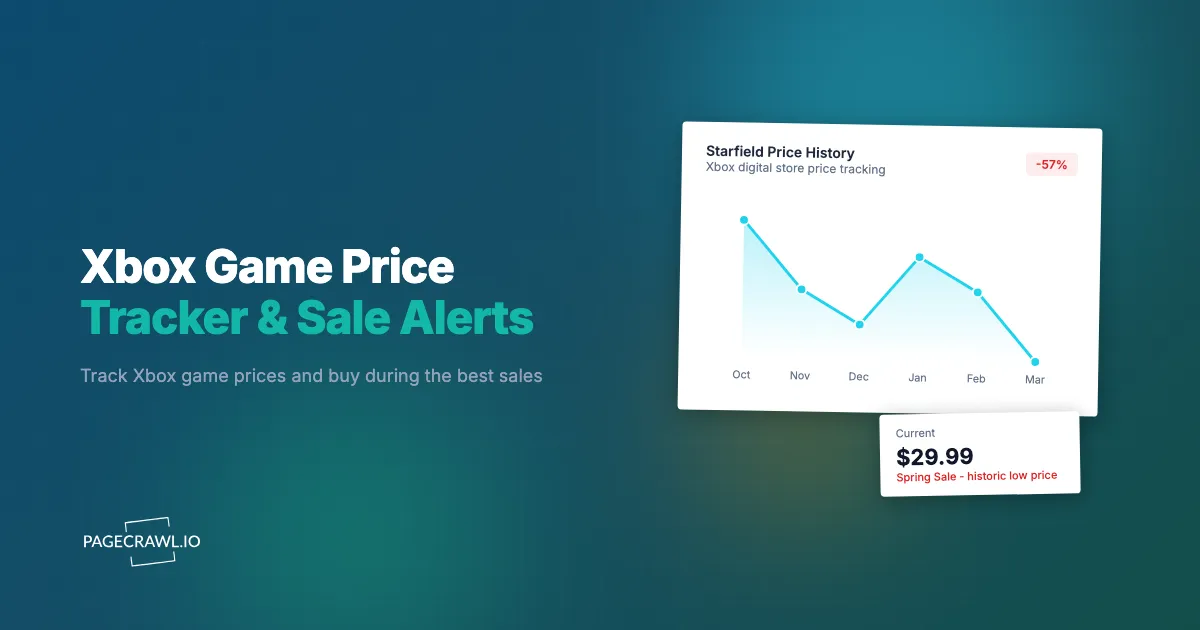
You spot Starfield on sale at 40% off during an Xbox Spring Sale. You buy it, feeling good about the deal. Two weeks later, it hits 60% off during a surprise publisher event you never heard about. A month after that, it appears on Game Pass, meaning you could have played it for the cost of your existing subscription. This pattern repeats across the Xbox ecosystem constantly, and without tracking, there is no way to know when you are getting the best deal versus just an okay one.
Microsoft runs sales across the Xbox Store, the Microsoft Store web portal, and the Xbox app on PC and mobile. Add in Game Pass Core monthly games, Game Pass additions, and third-party retailer deals on digital codes, and you have a pricing landscape that shifts constantly. Prices on the same game can differ between the Xbox console store and the PC Microsoft Store on the same day. Publisher sales overlap with platform sales in unpredictable ways. DLC pricing follows its own cycle entirely.
This guide covers how Xbox pricing works across all these channels, why standard tracking methods leave gaps, and how to set up automated monitoring that catches every meaningful price drop.
How does Xbox game pricing work?
Xbox game pricing runs on several overlapping systems at once: seasonal Microsoft Store sales, weekly Deals with Gold and Spotlight rotations, publisher-run promotions, Game Pass additions and removals, and third-party digital code retailers. Each has its own discount cadence and logic, which is why a single game can carry three different effective prices on the same day.
Microsoft Store Sales
The Microsoft Store runs regular promotional events for Xbox and PC games. Major events include seasonal sales (Spring Sale, Summer Spotlight, Black Friday/Countdown Sale), publisher-specific promotions, and Xbox-exclusive deals. Unlike Steam's store-wide approach, Xbox sales tend to run shorter promotional windows, typically one to two weeks.
The Microsoft Store web portal on xbox.com shows the same pricing as the console store but is accessible from any browser. This is the version you can monitor with web-based tools. Each game has a dedicated store page with the current price, any active discount percentage, and the original price displayed with a strikethrough when a sale is active.
Deals with Gold and Xbox Spotlight Sales
Microsoft runs weekly rotating deals divided into two categories. Deals with Gold are exclusive to Game Pass Core and Game Pass Ultimate subscribers. Spotlight Sales are available to everyone. These weekly deals typically launch on Tuesday and run through the following Monday.
The weekly deals often include 50-75% discounts on titles that may not appear in larger seasonal sales. Because they rotate every week with a new selection, manually checking every Tuesday is tedious but necessary if you want to catch every deal.
Game Pass Impact on Pricing
Game Pass fundamentally changes how you should think about Xbox game pricing. Before buying any game, you need to know: Is it already on Game Pass? Is it coming to Game Pass soon? Has it been on Game Pass recently (suggesting it may return)?
Games leaving Game Pass receive a 20% discount for purchase, which sometimes represents the best deal available. Conversely, games joining Game Pass render a purchase unnecessary for subscribers. Tracking Game Pass additions and removals is as important as tracking prices.
Microsoft announces Game Pass additions on the Xbox Wire blog and social media, usually in two batches per month. Removals are announced roughly two weeks before the games leave. Monitoring these announcement pages catches changes that pure price tracking misses.
Publisher Sales
Publishers like Ubisoft, EA, Capcom, and Square Enix run their own promotional events on the Xbox Store. These publisher sales often align with new releases in the same franchise. An Assassin's Creed publisher sale typically coincides with a new entry's launch. A Call of Duty franchise sale accompanies the annual release cycle.
Publisher sales can offer deeper discounts than platform-wide seasonal sales, particularly for older titles in a franchise. They are also harder to predict because they depend on publisher marketing calendars rather than Microsoft's seasonal schedule.
Digital Code Retailers
Physical and digital retailers like Amazon, Best Buy, Newegg, and CDKeys sell Xbox digital game codes that are often cheaper than the Microsoft Store price, even during official sales. These retailers run their own promotions independently of Microsoft's calendar.
A game might be full price on the Xbox Store while simultaneously available as a discounted digital code on Amazon. Tracking both the official store and third-party retailers gives you the complete picture.
Why do standard Xbox price trackers fall short?
Standard trackers fall short because none of them let you set a price threshold or choose how the alert reaches you. The Xbox wishlist sends occasional generic promotional email, the Xbox app curates deals algorithmically rather than by your wishlist, and third-party aggregators are email-only with no webhook, Slack, or Discord output.
Xbox Wishlist Limitations
The Xbox app and Microsoft Store have a wishlist feature. You can add games to your wishlist, and Microsoft will occasionally send promotional emails mentioning sale items. However, the wishlist notification system is unreliable. Many users report never receiving sale alerts, or receiving them only for major seasonal events while missing weekly deals and publisher promotions.
There is no way to set a price threshold. You cannot tell the Xbox wishlist "alert me when this game drops below $20." You either get a generic promotional email or you do not.
Xbox App Notifications
The Xbox app on mobile shows deal highlights, but the selection is curated by Microsoft's algorithm. It surfaces popular deals, not necessarily deals on games you care about. The app's store browser also lacks any form of personalized alerting.
Third-Party Deal Aggregators
Sites like Deku Deals, TrueAchievements, and Xbox Store Checker aggregate Xbox deals and show price history. These are useful research tools but have limitations as alerting systems.
Deku Deals covers Xbox, PlayStation, and Nintendo pricing with historical charts and wishlist features. It sends email alerts when wishlisted games go on sale. Its limitation is that alerts are email-only with no webhook, Slack, or Discord integration, and no price threshold customization beyond "any sale."
TrueAchievements focuses on the Xbox ecosystem and shows current deals alongside achievement information. Its deal tracking is comprehensive but alerts are basic email notifications without customization options.
Xbox Store Checker shows current pricing across regions. It is useful for finding regional price differences but does not offer persistent monitoring or automated alerts.
None of these tools let you build automated workflows triggered by price changes, integrate with team communication tools, or monitor non-price elements on store pages.
Setting Up Xbox Price Tracking with PageCrawl
Web monitoring with price tracking and drop alerts fills the gaps left by dedicated game deal trackers, particularly around automation, flexible alerting, and monitoring beyond just price numbers.

Monitoring Microsoft Store Pages
Step 1: Find the Microsoft Store URL
Navigate to the game on the Microsoft Store website (not the Xbox app). The URL format is typically:
https://www.xbox.com/en-US/games/store/game-name/PRODUCT-IDCopy this URL. The web version of the store shows all the pricing information visible on the console store.
Step 2: Create a Price Monitor
In PageCrawl, add the Microsoft Store URL and select "Price" tracking mode. This automatically detects the displayed price on the store page and, as the guide to tracking numeric values explains, charts it over time so you can see the discount pattern. PageCrawl renders the page in a full browser, so JavaScript-rendered pricing elements and dynamic sale banners load correctly.
Step 3: Set Check Frequency
For general wishlist tracking, checking every 12 hours catches most sales within the first day. During known sale periods (Black Friday, Spring Sale, Summer Game Fest), increase to every 4-6 hours. For weekly Deals with Gold tracking, a Tuesday morning check at the start of each deal rotation is essential.
Step 4: Configure Notifications
Choose where you want price drop alerts delivered:
- Email: Reliable for non-urgent deal tracking
- Slack: Fast alerts in a dedicated deals channel
- Discord: Perfect for gaming communities with price-watching channels
- Telegram: Mobile push notifications when you are away from your desk
- Webhook: Structured data for building automation workflows
For targeting specific price elements when the page layout is complex, the CSS selector guide explains how to isolate the exact element you need.
Monitoring Game Pass Announcements
Game Pass additions and removals are announced on the Xbox Wire blog. Create a content monitor for the Game Pass announcement page using "Content Only" mode. This strips navigation and repeated elements, focusing on the actual article content.
When new games are announced for Game Pass, you receive an alert with a summary of what changed. This catches additions and removals before they take effect, giving you time to finish a game before it leaves or cancel a planned purchase when a game joins.
Tracking Weekly Deals
The Xbox Store deals page shows current weekly promotions. Monitor this page on a weekly cadence (every Tuesday) to catch the new rotation. Use "Full Page" mode to capture all listed deals, or "Content Only" to focus on the deal listings without navigation elements.
Combined with individual game monitors, this gives you both targeted tracking (specific games you want) and broad discovery (deals on games you might not have considered).
Building a Comprehensive Xbox Deal Dashboard
Effective Xbox deal tracking requires monitoring multiple sources simultaneously.
Source Categories to Monitor
Primary sources (monitor these first):
- Individual Microsoft Store pages for your most-wanted games
- The Xbox Store weekly deals page
- Xbox Wire Game Pass announcement posts
Secondary sources (expand as needed):
- Publisher sale landing pages during promotional events
- Third-party digital code retailers like Amazon for Xbox digital codes
- Best Buy Xbox game deals pages
Community sources (for discovery):
- Xbox subreddit deal threads
- Xbox deal aggregator sites
Organizing Your Monitors
Create a folder structure in PageCrawl to keep your Xbox monitoring organized:
- Xbox Wishlist: Individual game price monitors for specific titles
- Xbox Deals: Weekly deal page monitors and Game Pass announcement trackers
- Retailer Codes: Monitors for digital code prices on third-party stores
This separation lets you manage notification preferences by category. You might want a Discord alert on every detected change for high-priority wishlist titles but daily digest emails for general deal page changes.
Price Tracking Strategies by Game Type
Different types of Xbox games follow different pricing patterns, and your monitoring approach should reflect this.
New AAA Releases
New $69.99 releases from major publishers rarely go on sale within the first month. The first meaningful discount (15-25% off) typically arrives 2-3 months after launch. The first deep discount (40%+ off) usually takes 6-12 months.
For new releases, check whether the game is coming to Game Pass before buying. First-party Microsoft titles launch on Game Pass day one. Third-party titles sometimes join months later. Monitoring Xbox Wire announcements helps you avoid buying a game that joins Game Pass shortly after.
Indie Games
Indie titles on Xbox follow less predictable pricing patterns. Some go on sale frequently with modest discounts. Others hold their price for long periods, then appear in a deep-discount bundle or join Game Pass unexpectedly.
For indie games, "Content Only" monitoring on the store page catches both price changes and additions to subscription services like Game Pass or EA Play.
DLC and Season Passes
Xbox DLC pricing follows its own cycle. Season passes and expansion content often see smaller discounts than base games. However, "Complete Edition" or "Definitive Edition" bundles that include the base game plus all DLC sometimes offer better value than buying DLC separately, even if you already own the base game.
Monitor both the individual DLC pages and the complete edition page. Compare the total cost of buying remaining DLC individually versus buying the complete bundle.
Backward Compatible Titles
Xbox 360 and original Xbox backward compatible games on the digital store frequently hit deep discounts during seasonal sales, sometimes dropping to $2-5. These discounts appear in the weekly Deals with Gold rotation regularly. A content monitor on the weekly deals page catches these bargains.
Multi-Platform Price Comparison
Many games release simultaneously on Xbox, PlayStation, PC (Steam/Epic), and the Nintendo Switch. Prices vary between platforms, and sales happen at different times.
Cross-Platform Tracking
If you own multiple platforms, or if you are deciding which platform to buy a game on, tracking prices across all platforms simultaneously helps you find the best deal regardless of storefront.
For Steam price tracking, our Steam price tracker guide covers setup in detail. The approach is similar for each storefront: create a price monitor for the game on each platform's store page.
Platform-Specific Considerations
Xbox prices in certain regions can be significantly lower than equivalent prices on other platforms. The Argentina and Turkey Xbox stores historically offered the lowest prices, though Microsoft has been adjusting regional pricing. When comparing cross-platform, make sure you are comparing prices in the same currency and region.
Xbox also has the Microsoft Rewards program, where you earn points through Bing searches and Xbox purchases that can be redeemed for store credit. Factor in accumulated Rewards points when comparing effective prices across platforms.
Using Webhooks for Automated Deal Workflows
Webhooks let you build automated responses to price changes instead of just receiving notifications.
Webhook Integration Basics
When PageCrawl detects a price change on a monitored Xbox store page, a webhook sends structured JSON data to your specified URL. This data includes the monitored URL, the detected change, timestamps, and change details.
Automation Ideas
Price threshold filtering: PageCrawl's conditional price alerts can notify you only when the price drops at or below your target, no extra tooling required. For more elaborate logic, route webhook data through an automation platform (Zapier, Make, n8n, or a custom script) that extracts the new price and compares it against your target. Only forward the notification when the price is at or below your threshold. This eliminates noise from small discounts when you are waiting for a deep sale.
Cross-platform comparison engine: If you are monitoring the same game across Xbox, Steam, and PlayStation, your automation can compare all three prices when any one changes. It alerts you only when one platform offers the best current deal.
Budget-aware alerting: Track your monthly gaming budget in a spreadsheet. When a game drops below your target price, the automation checks your remaining budget before alerting you. If you have already spent your budget, it logs the deal for future reference instead of tempting you.
Spreadsheet logging: Send every price change to Google Sheets. Over time, this builds your own historical price database. Analyze seasonal patterns, identify which sale events offer the deepest discounts, and set more informed target prices.
Community sharing: Route alerts to a shared Discord channel where friends see each deal as it lands. This works well for gaming groups who share purchase recommendations.
Game Pass Monitoring Strategy
Game Pass deserves its own monitoring approach because it changes the economics of game purchasing entirely.
What to Track
- Xbox Wire blog: Official announcements for additions and removals
- Xbox Game Pass app/page: Current catalog changes
- EA Play integration: EA titles available through Game Pass Ultimate
- Perks and quests: Additional benefits announced through Game Pass
Timing Purchases Around Game Pass
The worst gaming purchase is buying a game the week before it joins Game Pass. To avoid this:
- Monitor Game Pass announcement pages for upcoming additions
- When you are about to buy a game, check whether it has been rumored or announced for Game Pass
- First-party Microsoft studio games always launch on Game Pass day one, so never buy these at full price if you are a subscriber
- Third-party games sometimes get announced for Game Pass only days before they appear, making monitoring essential
Post-Game-Pass Purchases
When a game you enjoyed leaves Game Pass, it receives a 20% discount for Game Pass subscribers. If you want to keep playing, this discount combined with any ongoing sale can offer the best purchase price. Monitor the game's store page during the removal window to stack discounts.
Common Challenges
Region-Locked Pricing
Microsoft Store prices vary by region. The US, UK, and EU stores show different prices for the same games. Ensure your monitor is pointing to the correct regional store URL for your account's region.
Pre-Order and Coming Soon Pages
Pre-order pages sometimes change format when the game launches, which can break a monitor's element targeting. If you are monitoring a pre-order page, be prepared to update the monitor after launch day when the page structure changes.
Bundle and Edition Pricing
Games with multiple editions (Standard, Deluxe, Ultimate) each have separate store pages. Monitor the specific edition you are considering. Sometimes the price gap between editions narrows during sales, making an upgrade worthwhile. Other times, the Deluxe edition gets a smaller percentage discount than Standard.
Xbox Smart Delivery
Smart Delivery means a single purchase covers both Xbox One and Xbox Series X/S versions. However, some publishers opted out of Smart Delivery and charge separately for each generation. Check whether the store page you are monitoring is for the generation you play on.
Dynamic Page Content
Microsoft Store pages include dynamic elements like "People also bought" sections and recommendation carousels that change independent of the game's actual pricing. Using "Price" tracking mode or targeting the price element with a CSS selector avoids false alerts from these unrelated changes. PageCrawl's noise filtering also helps here by automatically ignoring minor, insignificant changes like ad rotation, recommendation shuffles, and timestamp updates. This keeps your alerts focused on actual price movements rather than page clutter that has nothing to do with the deal you are tracking.
Comparing Xbox Price Tracking Methods
| Feature | Xbox Wishlist | Deku Deals | TrueAchievements | PageCrawl |
|---|---|---|---|---|
| Price alerts | Basic email | Email (any sale) | Email, Slack, Discord, Telegram, Webhook | |
| Price thresholds | No | No | No | Yes (built-in conditional alerts) |
| Historical data | No | Yes | Yes | Yes (builds over time) |
| Game Pass tracking | No | Yes | Partial | Yes (with announcement monitors) |
| Cross-platform | No | Yes | No | Yes (with separate monitors) |
| Automation | No | No | No | Yes (webhooks + API) |
| Custom notifications | No | No | No | Yes |
| Cost | Free | Free | Free (premium optional) | Free tier (6 monitors) |
What else is worth monitoring on an Xbox store page?
Beyond price, three things on an Xbox store page reward monitoring: the description block, which quietly updates with DLC teasers and feature announcements; the player rating, which shifts as reviews accumulate; and the PC system requirements, which change with patches. Price is the most common target, but these carry real signal too, which is why product page monitoring covers descriptions and specs as well as pricing.
Content Ratings and Descriptions
Store page descriptions occasionally update with new content announcements, DLC teasers, or gameplay feature additions. Monitoring the description section catches these updates.
Player Reviews and Ratings
Xbox store page ratings change as more players review a game. A significant rating shift might influence your purchase decision, particularly for games you have been on the fence about.
System Requirements (PC)
For games available on both Xbox console and PC through the Microsoft Store, the PC version's system requirements are listed on the store page. These sometimes update with patches that change hardware demands.
Can you compare one game's price across the Microsoft Store and every retailer at once?
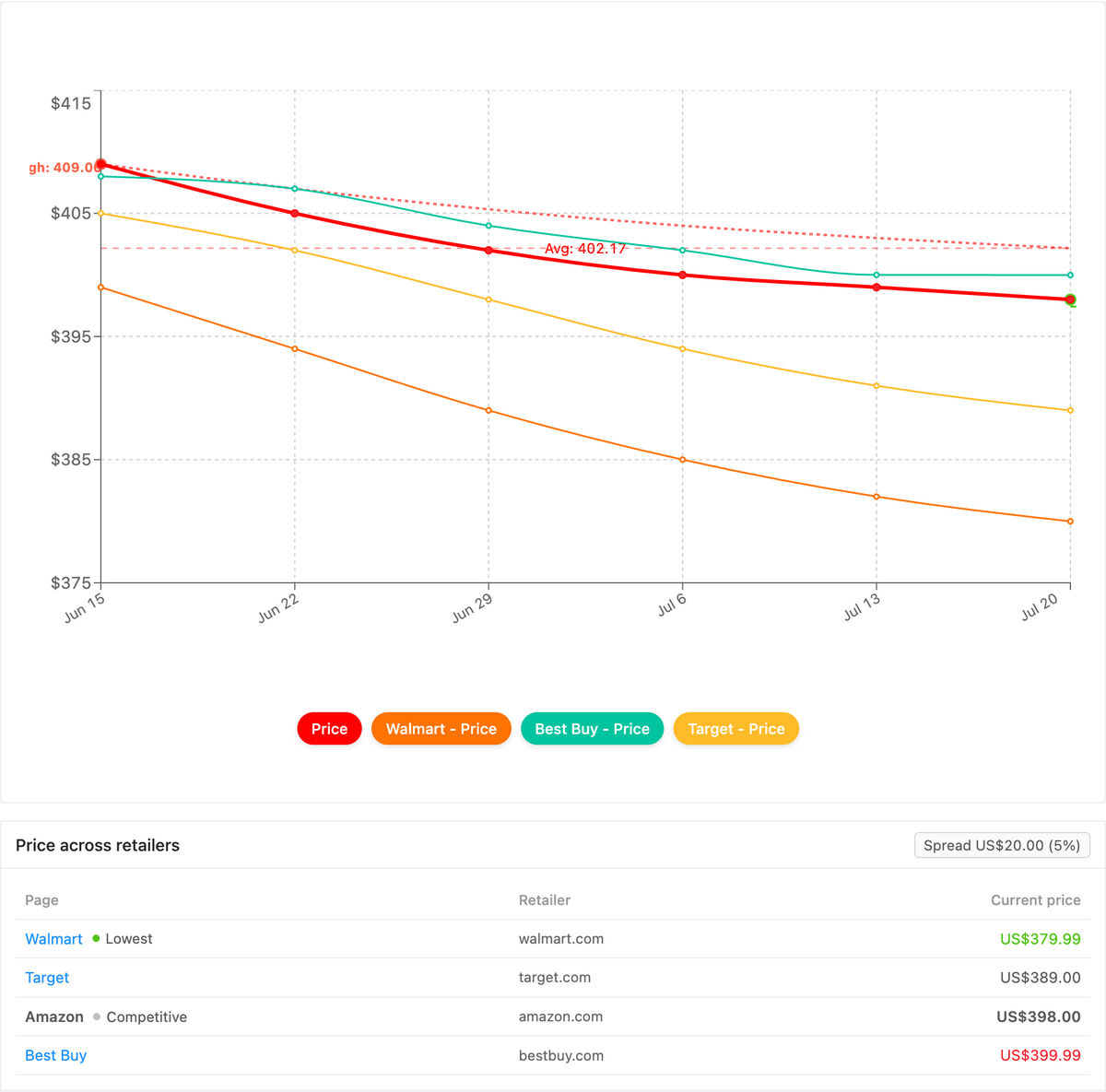
Yes. PageCrawl's Product Comparison capability groups the monitors for one Xbox game across every seller into a single view, highlights the cheapest advertised price, and tracks the spread between the lowest and highest listing. Instead of flipping between the Microsoft Store, Amazon, Best Buy, and CDKeys tabs, one grouped view shows where the best deal actually lives.
Once your per-page price monitors are running, Product Comparison stitches together the ones that share a game (by SKU, product ID, or your own reference tag) into one grouped comparison. The Xbox Store listing, third-party digital code sellers like Amazon and Newegg, and cross-platform storefronts line up side by side, the lowest advertised price is flagged, and the spread between cheapest and most expensive is a live figure. When a publisher sale or a discounted digital code widens the gap, a cheapest-price or spread-threshold alert surfaces on the next check, routed to email, Slack, or a webhook. You can also export the whole grid as a spreadsheet. The full walkthrough lives in the cross-retailer price comparison guide, and Product Comparison is a custom capability we enable on request.
Choosing your PageCrawl plan
PageCrawl's Free plan lets you monitor 6 pages with 220 checks per month, which is enough to validate the approach on your most critical pages. Most teams graduate to a paid plan once they see the value.
| Plan | Price | Pages | Checks / month | Frequency |
|---|---|---|---|---|
| Free | $0 | 6 | 220 | every 60 min |
| Standard | $8/mo or $80/yr | 100 | 15,000 | every 15 min |
| Enterprise | $30/mo or $300/yr | 500 | 100,000 | every 5 min |
| Ultimate | $99/mo or $999/yr | 1,000 | 100,000 | every 2 min |
Annual billing saves two months across every paid tier. Enterprise and Ultimate scale up to 100x if you need thousands of pages or multi-team access.
Standard at $80/year pays for itself the first time you catch a 50% publisher sale on a game you were about to buy at full price. 100 monitored pages is more than enough to cover your entire wishlist across the Microsoft Store, Xbox Wire Game Pass announcements, and a few third-party digital code retailers. The 15-minute check frequency means you find out about weekly Deals with Gold rotations within a check cycle of Tuesday rollover, not after the best titles are already in other people's libraries.
Getting Started
Pick 3-5 Xbox games you are actively watching. Find their Microsoft Store web URLs (xbox.com/games/store format), and create PageCrawl monitors using "Price" tracking mode. Add a second monitor for the Xbox Wire Game Pass announcement page using "Content Only" mode to catch subscription additions that might save you a purchase.
Set up Discord or Slack notifications for the fastest alerts, and let the monitors run through at least one weekly deal rotation to see the value. Within a few weeks, you will have baseline price data and a sense of each game's discount patterns.
PageCrawl's free tier includes 6 monitors, enough to track a handful of priority titles plus Game Pass announcements. Paid plans start at $80/year for 100 monitors (Standard) and $300/year for 500 monitors (Enterprise), giving you room to track an entire wishlist across the Xbox Store and third-party retailers.