Picture a scenario that plays out on Wikipedia constantly. Someone edits a company's article to add false information about a product recall that never happened. The edit sits there quietly for days before anyone on the communications team notices. In the meantime a journalist reads the article as background, the claim gets repeated elsewhere, and what started as one anonymous edit becomes a correction request across several publications.
Wikipedia articles are among the most visible pages on the internet. They rank on the first page of Google for nearly every notable person, company, and topic. They are frequently cited by journalists, researchers, and AI systems. Yet most organizations, researchers, and individuals have no systematic way of knowing when articles relevant to them change. Wikipedia's language editions absorb hundreds of thousands of edits every day, as the Wikimedia Foundation's public statistics dashboards show, and any of those edits might affect content you care about.
This guide covers why Wikipedia monitoring matters, the limitations of Wikipedia's built-in tools, and how to set up automated alerts that tell you what changed as soon as the next check runs.
Why should you monitor Wikipedia?
You should monitor Wikipedia because its articles are a de facto public record that anyone can rewrite. Brand teams watch for reputation-damaging edits, competitive analysts read edits as early signals, researchers track how coverage of a field evolves, and journalists use edits as leads. Understanding your use case helps you configure monitoring effectively.
Brand Reputation Management
For companies and public figures, Wikipedia articles function as a de facto public record. Journalists check Wikipedia for background. Investors review company articles before meetings. Customers encounter Wikipedia pages through search results.
Edits to these articles, whether accurate corrections, biased additions, or outright vandalism, can shape public perception before anyone on your team knows the content changed. Monitoring means you learn about a change on the next scheduled check rather than days or weeks later.
Note: Wikipedia's conflict of interest policy discourages editing articles about your own organization. Monitoring is not about controlling content. It is about awareness. When you see a problematic edit, the appropriate response is to flag it to Wikipedia's community through legitimate channels, not to edit the article yourself.
Competitive Intelligence
Your competitors' Wikipedia articles contain useful intelligence. Executive changes, product launches, controversies, legal actions, and strategic shifts often appear in Wikipedia edits. Sometimes these edits happen before formal announcements, as employees, journalists, or industry insiders update articles with emerging information.
Monitoring competitor Wikipedia pages gives you a low-effort way to track significant developments. When an edit adds a new subsidiary, mentions an acquisition, or updates revenue figures, that is a signal worth investigating further.
Research and Academic Tracking
Researchers tracking specific topics benefit from knowing when Wikipedia's coverage evolves. New citations appear, sections get rewritten with updated information, and editorial disputes reveal emerging controversies or changing consensus on topics.
For academic monitoring, Wikipedia edits can signal new publications gaining attention, shifting scholarly consensus, or emerging topics within a field. The edits themselves serve as a loose indicator of public interest and attention. If you are conducting broader online reputation monitoring, Wikipedia should be part of your toolkit. See our guide to online reputation monitoring for the full picture.
Vandalism Detection
Vandalism, which Wikipedia defines as editing in a deliberately disruptive way, ranges from obvious (profanity, nonsense text) to subtle (changing dates, altering statistics, inserting misleading claims). Wikipedia's own community catches most vandalism quickly, but "most" is not "all." Subtle vandalism on less-trafficked articles can persist for weeks or months.
For articles about your organization, your executives, or your products, automated content monitoring for unauthorized edits catches vandalism that might otherwise persist long enough to cause real harm.
Journalism and Fact-Checking
Journalists and fact-checkers use Wikipedia as a starting point for research. Knowing when articles change helps identify emerging stories, track evolving narratives, and verify that information remains accurate. Some newsrooms monitor Wikipedia pages related to breaking news to track how the public record evolves in real time.
Does Wikipedia's built-in Watchlist do the job?
The Watchlist works for casual tracking but not for serious monitoring. It is email-only, delivery is batched and delayed, it never shows you what actually changed, it requires a registered account, and it cannot be shared with a team. Wikipedia's own Watchlist documentation describes the feature; the sections below cover where it falls short.
How the Watchlist Works
Any registered Wikipedia user can add articles to their Watchlist by clicking the star icon on an article page. The Watchlist page shows recent edits to all watched articles, including timestamps, editor usernames, and edit summaries.
You can configure the Watchlist to send email notifications when watched pages change. The settings allow filtering by edit type (minor edits, bot edits, anonymous edits).
Watchlist Limitations
Despite being the official tool, the Watchlist has significant drawbacks for serious monitoring.
Email-only notifications. The Watchlist sends email alerts only. No mobile push notifications, no Slack or Discord integration, no webhook output for automation. For time-sensitive monitoring (brand reputation, vandalism detection), email is too slow.
Delayed and batched delivery. Wikipedia's email notifications do not arrive right away. They can be delayed by minutes or hours, and multiple edits may be batched into a single notification. For rapid vandalism detection, this delay defeats the purpose.
No content diff in notifications. Email notifications tell you that an article changed, but they do not show what changed. You have to visit Wikipedia and manually review the diff. For monitoring dozens of articles, this workflow is time-consuming.
Requires a Wikipedia account. The Watchlist is only available to registered users. While creating an account is free, it adds a setup step and requires managing yet another account.
No team features. The Watchlist is personal. There is no way to share a watchlist with a team, assign monitoring responsibilities, or centralize alerts. Each person needs their own account and watchlist.
Limited filtering. While you can filter by edit type, you cannot filter by content (e.g., alert me only when the "Controversies" section changes). Every edit triggers a notification, regardless of significance.
Can you monitor Wikipedia edits with RSS feeds?
Yes. Wikipedia generates an RSS feed for every article's revision history, and you can access it by appending ?action=history&feed=rss to an article URL. No account is needed. The trade-off is that RSS readers poll on their own schedule and show only edit metadata, never the content that actually changed.
RSS Feed Advantages
- No Wikipedia account required
- Can be consumed by RSS readers and automation tools
- Shows edit summaries and timestamps
- Works with any article
RSS Feed Limitations
- RSS readers check on their own schedule (typically every 15-60 minutes)
- No push notifications, you must open the reader to see updates
- Limited filtering (all edits, no content-based filtering)
- Parsing edit diffs from RSS requires additional tooling
- Does not show the actual content change, only edit metadata
For a comprehensive look at RSS-based monitoring approaches, see our guide to monitoring RSS feeds.
Monitoring Wikipedia with PageCrawl
Web monitoring tools provide the most flexible and reliable approach to Wikipedia change detection, combining fast notifications with content-level tracking.

Setting Up a Wikipedia Article Monitor
Step 1: Choose the right URL. For the cleanest monitoring results, use the article's canonical URL (e.g., https://en.wikipedia.org/wiki/Article_Name). Avoid URLs with revision IDs, section anchors, or special parameters.
Step 2: Add the URL to PageCrawl. When you paste a Wikipedia article URL, PageCrawl recognizes it and applies Reader mode automatically, so there is nothing to configure. If you prefer, you can switch the tracking mode yourself to "Reader" or "Content Only." Reader mode strips navigation, sidebars, and editing interface elements, focusing on the article text itself. This is particularly valuable for Wikipedia, where pages contain extensive sidebar content, edit links, citation tooltips, and category listings that change independently of the article body. Reader mode eliminates all of that noise, so you only receive alerts when the actual article content changes. Content Only mode extracts just the main content.
Step 3: Configure check frequency. For brand reputation monitoring where speed matters, set checks every 1-2 hours. For general research tracking, checks every 6-12 hours provide sufficient coverage while using fewer resources. For high-profile articles during breaking news events, increase frequency temporarily.
Step 4: Set up notifications. Choose your preferred notification channels:
- Telegram or Discord: Fastest delivery for time-sensitive monitoring (brand reputation, vandalism detection)
- Slack or Microsoft Teams: Integrates with team workflows for collaborative monitoring
- Email: Sufficient for low-urgency research tracking
- Webhook: Feeds change data into custom systems or dashboards
Step 5: Verify the first check. After PageCrawl performs its initial check, review the captured content to confirm it matches the article text. This baseline becomes the reference point for detecting future changes.
Choosing What to Monitor: Content, Edits, or a Category
An article page is not the only thing worth watching on Wikipedia, and the right tracking mode depends on what you actually care about. PageCrawl recognizes the URL you paste and sets a sensible default for each case:
- The article content (what the page says). Paste the article URL (
/wiki/Article_Name). PageCrawl applies Reader mode and alerts you when the prose changes. - The edits themselves (who changed what, and vandalism). Paste the article's revision-history URL (the "View history" tab,
.../w/index.php?title=Article&action=history). PageCrawl reads the history as a feed, so every new edit arrives as its own item with the editor and edit summary, rather than a content diff. - A category's membership (new articles entering or leaving a topic). Paste a
Category:page. PageCrawl uses feed mode to catch articles added to or removed from the category, which is useful for tracking a field, a list of companies, or a class of events over time. - A single section (for example only "Controversies"). Add the article URL, then override the tracking to target that section by CSS selector, so unrelated edits elsewhere in the article stay quiet.
Monitoring Specific Sections
Not all sections of a Wikipedia article change equally, and not all changes are equally important to you. A brand manager might only care about the "Controversies" or "Criticism" section. A researcher might track only the "References" section for new citations.
PageCrawl can focus monitoring on specific page sections using CSS selectors. Wikipedia articles use consistent HTML structure with identifiable section headings. By targeting a specific section, you avoid false alerts from unrelated edits (typo fixes in the introduction, for example) and focus on the content that matters to your use case. For more on targeting specific elements, see our CSS selector guide.
Understanding What Changed
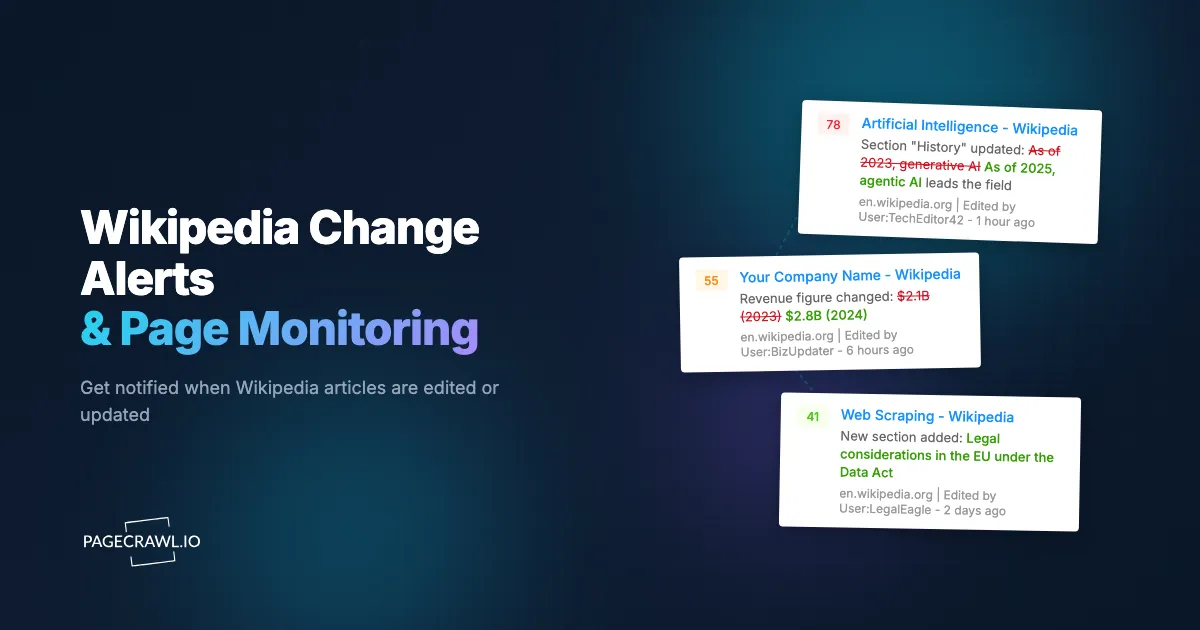
When PageCrawl detects a change, the alert includes a summary of what changed. PageCrawl's AI-powered change summaries describe the edit in plain language: "A new paragraph was added to the 'Products' section describing a product recall" or "The founding date was changed from 2015 to 2014."
This summary lets you quickly assess whether an edit requires action without visiting the Wikipedia page and manually reviewing the diff. For significant changes, you can then review the full diff on Wikipedia and take appropriate action.
Use Cases in Detail
Brand Managers
For brand and communications professionals, Wikipedia monitoring is a reputation management essential.
What to monitor:
- Your company's main Wikipedia article
- Articles for key executives and founders
- Product-specific articles (if they exist)
- Articles for parent companies, subsidiaries, or closely related organizations
- Industry articles that mention your company
What to watch for:
- New content in "Controversies" or "Criticism" sections
- Changes to financial figures or company statistics
- Removal or addition of citations
- Changes to the article's tone or framing
- Vandalism (obvious or subtle)
How to respond: When you detect a problematic edit, do not edit the article yourself. Wikipedia's Conflict of Interest policy prohibits organizational self-editing. Instead, flag the issue to Wikipedia's community through talk page discussions or report clear vandalism through Wikipedia's reporting systems. For persistent issues, consult Wikipedia's "Requested edits" process. To understand how this fits into broader brand monitoring, including AI-generated search results that draw from Wikipedia, see our guide on monitoring your brand in AI search.
Researchers and Academics
Researchers use Wikipedia monitoring to track how public understanding of their field evolves.
What to monitor:
- Articles on your research topics
- Articles on methods or technologies relevant to your work
- Biographical articles for key figures in your field
- Articles that cite your publications
What to watch for:
- New citations added (may indicate emerging publications gaining attention)
- Section rewrites reflecting changing consensus
- New articles created on subtopics (signals growing public interest)
- Edit wars (may indicate controversial or evolving topics)
Journalists and Investigators
For journalists, Wikipedia edits can be both a source and a story.
What to monitor:
- Articles related to ongoing investigations
- Company articles ahead of earnings or major announcements
- Political figure articles during campaign seasons
- Breaking news subjects
What to watch for:
- Edits from IP addresses traceable to organizations (Wikipedia shows editor IPs for anonymous edits)
- Suspicious timing of edits (just before or after announcements)
- Removal of sourced information
- Addition of unsourced claims
Legal and Compliance Teams
Legal teams monitor Wikipedia for content that could affect litigation, regulatory compliance, or contractual obligations.
What to monitor:
- Company articles for legal or regulatory mentions
- Articles related to ongoing litigation
- Industry articles that reference compliance standards
- Executive biographies
Best Practices for Wikipedia Monitoring
Monitor the Right Articles
Start with articles directly relevant to you and expand outward. A company should monitor its own article, then executive articles, then competitor articles, then industry articles. Prioritize by impact: an edit to your company's article matters more than an edit to a general industry article.
Set Appropriate Check Frequency
Wikipedia articles for well-known topics can be edited many times per day. Less notable articles might go weeks without changes. Match your check frequency to the article's edit velocity and your urgency level.
High-profile company articles: every 1-2 hours. Research topic articles: every 6-12 hours. Low-activity articles: once daily.
Distinguish Signal from Noise
Not every Wikipedia edit requires your attention. Minor edits (typo fixes, formatting changes, bot edits) vastly outnumber substantive content changes. PageCrawl's change summaries help you quickly identify significant edits without reviewing every minor adjustment, and notification conditions and filters let you fire alerts only when a keyword or section you care about is touched.
Over time, you will develop a sense for which types of changes matter. Formatting-only changes rarely need attention. New paragraph additions almost always deserve review. Citation additions or removals warrant investigation.
Keep Records
For brand reputation and legal purposes, maintaining a record of Wikipedia content over time has value. PageCrawl automatically captures snapshots of monitored pages at every check, creating an archive of how the article looked at each point in time. This is useful for documenting when specific content appeared, how long vandalism persisted, or how an article evolved during a newsworthy event. For long-term archiving needs, see our guide on website archiving.
Coordinate with Your Team
If multiple team members need awareness of Wikipedia changes, route alerts to a shared channel (Slack, Teams, or Discord). This ensures coverage when individuals are unavailable and creates a shared record of monitoring activity.
How do you monitor Wikipedia in multiple languages?
You monitor other language editions exactly the same way: add each edition's article URL as its own monitor. Wikipedia runs more than 300 language editions, each maintained by a separate community of editors, so content can differ significantly between them because each community writes independently.
For international organizations, monitoring articles across relevant language editions is important. An edit to your German Wikipedia article might contain information or framing that differs from the English version. PageCrawl monitors any URL, so adding non-English Wikipedia articles works the same as English ones.
For multilingual monitoring, consider that edit patterns differ by language edition. The English Wikipedia is the most actively edited and therefore changes most frequently. Smaller language editions may have articles that go months without changes but receive less community oversight, meaning vandalism can persist longer.
What should you monitor beyond Wikipedia?
Beyond Wikipedia, watch the places Wikipedia content flows into: AI answer engines that cite it, news coverage that borrows from it, and the rest of the pages that describe you. Wikipedia monitoring is most effective as part of a broader web monitoring strategy rather than on its own.
AI search results. ChatGPT, Google's AI Overviews, Perplexity, and other AI systems draw heavily from Wikipedia. It is one of the small set of source pages these engines cite most, so an edit to your Wikipedia article can propagate into AI-generated answers about you within days. Monitoring your Wikipedia page is therefore a core part of watching the source pages AI engines cite about your brand, and pairing it with checks on the answers themselves gives you complete awareness. See our guide on monitoring your brand in AI search.
News aggregators. Journalists use Wikipedia for background research. Monitoring news sources alongside Wikipedia helps you see when Wikipedia content influences media coverage, which is what media monitoring across journalists and publications is for.
General website changes. Wikipedia monitoring applies the same principles as any website change detection. For a broader view of monitoring strategies, see our comprehensive guide to monitoring website changes.
Choosing your PageCrawl plan
PageCrawl's Free plan lets you monitor 6 pages with 220 checks per month, which is enough to validate the approach on your most critical pages. Most teams graduate to a paid plan once they see the value.
| Plan | Price | Pages | Checks / month | Frequency |
|---|---|---|---|---|
| Free | $0 | 6 | 220 | every 60 min |
| Standard | $8/mo or $80/yr | 100 | 15,000 | every 15 min |
| Enterprise | $30/mo or $300/yr | 500 | 100,000 | every 5 min |
| Ultimate | $99/mo or $999/yr | 1,000 | 100,000 | every 2 min |
Annual billing saves two months across every paid tier. Enterprise and Ultimate scale up to 100x if you need thousands of pages or multi-team access.
Standard at $80/year covers 100 monitors, which is enough to watch your company article, key executive articles, competitor pages, and a dozen industry topics without hitting any limits. For brand and communications teams, a single incident caught early (vandalism corrected before a journalist cites it, or a misleading edit flagged before it spreads) is worth far more than the annual cost. Enterprise at $300/year covers 500 articles for organizations monitoring across multiple language editions, subsidiaries, or a broad competitor set, and the 5-minute check frequency means you are among the first to know when something changes on a high-profile page.
Getting Started
Pick the two or three Wikipedia articles most important to you. For a brand manager, that is your company article and your CEO's article. For a researcher, it is the core topic articles in your field. For a journalist, it is the subjects of your current investigations.
Set up monitors in PageCrawl using Reader mode, configure Telegram or Slack notifications for fast delivery, and set check frequency to every 2-4 hours as a starting point. Run the monitors for two weeks to understand the edit patterns on your articles.
PageCrawl's free tier includes 6 monitors, enough to track several Wikipedia articles alongside other important pages. The Standard plan at $80/year provides 100 monitors for comprehensive Wikipedia monitoring across companies, competitors, and topics. The Enterprise plan at $300/year covers 500 monitors for organizations needing extensive coverage across multiple languages and subject areas.
Start monitoring the Wikipedia pages that matter to you before the next edit you wish you had caught.