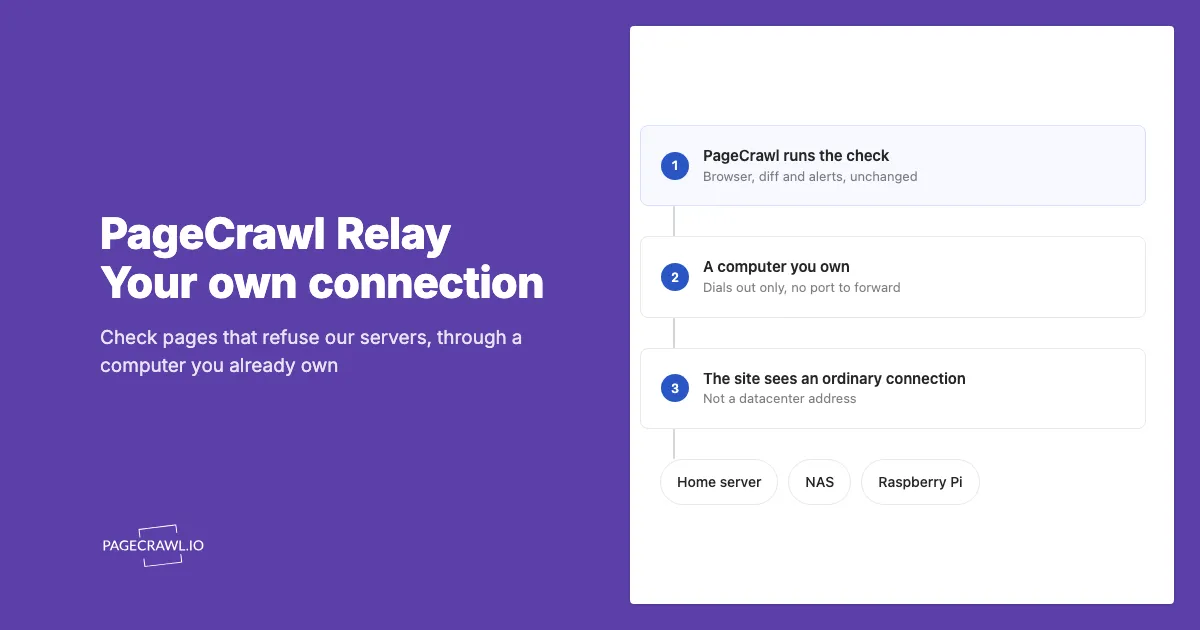
PageCrawl Relay lets PageCrawl check websites through your internet connection. You run a small app on your computer, and PageCrawl keeps watching for changes and sending alerts. It is useful when a public website opens at home but PageCrawl cannot read it.
For personal projects, try Relay on a computer you already own and can leave on. There is no PageCrawl relay fee on any plan, including Free. Your computer's electricity and internet usage still count, and normal monitoring limits apply.
For business monitoring, we recommend Enterprise or Ultimate and their managed connection options. These let you run checks without depending on your own computer or internet connection. Relay remains available on every plan when you specifically need to use your own connection.
What is PageCrawl Relay?
PageCrawl Relay is an app that gives PageCrawl a way to reach public websites through your computer's internet connection. You leave the app running and choose it for a monitor in PageCrawl. PageCrawl checks the page, saves what changed and sends your usual alerts. You keep using the same dashboard.
For example, a shop's product page opens on your home computer, but PageCrawl shows an error when checking it. Relay lets PageCrawl try that page through your home connection. If the check succeeds, you can use it for price or stock alerts. You do not need to keep the product page open.
It needs no port forwarding and accepts no incoming connections from the internet. It carries your team's monitoring traffic, with settings managed locally. Relay does not share your browser's signed-in session. Pages that require authentication still need a login configured in PageCrawl.
How does Relay work?
Relay creates a secure outbound connection from your computer to PageCrawl and keeps it open while the app is running. This means your computer starts the connection. PageCrawl does not connect directly to your computer from the internet.
When PageCrawl needs to check a website through Relay, it sends the request through this existing secure connection. Relay accesses the website through your internet connection and sends the website's response back to PageCrawl.
PageCrawl ↔ secure connection ↔ Relay on your computer ↔ Website
Because Relay starts the connection, you do not need to open router ports, configure port forwarding, run a public proxy server, or have a static IP address.
The website sees your connection. PageCrawl reads and compares the page, saves the results, and sends alerts according to your notification settings.
Why use Relay if you can self-host a change monitor?
For personal monitoring of public pages that need your connection, we recommend PageCrawl with Relay, even if you know how to self-host. You keep PageCrawl's monitoring, history and alerts while running only the connection service yourself. That keeps your local setup smaller and leaves more time to use the results.
Free software still has running costs. With a fully self-hosted monitor, you supply the computer, electricity and storage, plus time for setup, updates, backups and fixing problems. Hardware you already own can reduce the extra cost, but it does not remove the upkeep. With Relay, PageCrawl runs and maintains the monitoring application for you.
- A smaller job for your home computer. Relay does not run a browser to read pages or store monitoring history locally. That matters when considering a small board or used thin client. Resource use still depends on traffic, and running a full monitor on the same hardware needs its own evaluation.
- Ongoing maintenance handled by PageCrawl. We maintain and update the monitoring application. You do not need to operate the full monitoring application or manage its history storage and backups.
- Help when you need it. Paid plans include access to PageCrawl support for setup questions and monitoring issues. The Help Center is available on every plan.
- Keep the workflow you already use. Your PageCrawl history, notifications and optional AI summaries and filtering stay in one place. A disconnected relay does not remove existing history; new checks follow your chosen offline policy.
Fully self-hosting is worth considering for specific requirements such as keeping all monitoring data locally, reaching authorized private-network pages or modifying the monitoring application's code. Relay requires a PageCrawl account and blocks private and local addresses. Monitored content is processed and stored in PageCrawl, and your normal monitoring and AI allowances still apply.
For a small personal setup, start with our low-cost Relay tutorial. For business monitoring, we recommend Enterprise or Ultimate with managed connection options.
Why not just run a proxy server at home?
Running a proxy at home is an approach our super users have used to check pages through their own connection. Relay makes that easier: your computer connects to PageCrawl without opening a proxy port to the internet. You keep the benefit of using your connection, with fewer security settings to get right.
An internet-facing proxy needs authentication and access rules. A mistake can let other people send traffic through your connection. Relay avoids exposing that proxy endpoint: it connects out to PageCrawl and carries only your team's monitoring traffic.
| Proxy server at home | PageCrawl Relay | |
|---|---|---|
| Router setup | May need port forwarding and firewall rules | No port forwarding |
| Changing home IP | May need updated connection details | Reconnects through your current connection |
| Access | Depends on the proxy's configuration | Your team's monitoring traffic |
| When the machine sleeps | The proxy becomes unavailable | Checks follow your chosen offline policy |
| Private and local addresses | Depends on the proxy's configuration | Blocked |
Keep your relay token private. It gives the program access to the machine you enrolled, and you can revoke that access in Settings → More → Relays.
How does it keep my own network out of it?
Relay is for public websites. Private intranets, local devices and local-network addresses are blocked. Use it when a public page accepts your connection but rejects PageCrawl's, rather than to reach internal company systems. Pages that need authentication still require a login configured in PageCrawl.
The program is open source. The Relay setup guide explains its security limits and links to the source and security documentation for a closer review.
When is a relay actually useful?
Relay is mainly useful for personal monitoring when a public page works through your home connection but fails in PageCrawl. It can keep costs down if you already have a computer that stays on and can supply the bandwidth. It may help with connection-based restrictions, but does not guarantee access to every website.
- A site that treats the two connections differently. A public page opens for you but returns an access-denied message or challenge in PageCrawl.
- A public page that allows only your IP address. If a public website has approved your connection, Relay can use that connection for its checks. Private intranets and local-network addresses remain blocked.
- Content that varies by country in a way our locations do not cover, when you happen to be in the country in question.
When do you not need one?
You do not need a relay if your monitors already capture the right content through PageCrawl's included locations. Try the options available to your plan before setting up another connection. A managed location may also suit you better if you cannot keep a computer online or do not want monitoring traffic on your connection.
- The page already works. If your monitor is green, relaying it changes nothing except that your connection now pays for the traffic.
- An included location works for the page. Enterprise and Ultimate include Residential options at no extra cost, without keeping your own machine online.
- You monitor for a business. Enterprise or Ultimate is the recommended starting point, using managed connections instead of maintaining a relay.
- You need another country. A relay uses the connection of the computer running it. Check whether PageCrawl's included locations already cover the countries you need before considering paid traffic.
- You have no machine that stays on. A laptop relays only while it is awake. If the page needs your connection, use a computer that can stay online.
How can Relay save money on proxy traffic?
Relay can avoid paid proxy bandwidth charges when a page works through your connection. Our Residential Proxies and Web Unblocker offering includes optional Web Unblocker traffic at $10/GB. Checks routed through Relay do not spend that balance, so larger pages and more frequent checks can mean more bandwidth charges avoided.
| Web Unblocker traffic replaced by Relay | Bandwidth charge avoided |
|---|---|
| 5 GB | $50 |
| 10 GB | $100 |
Relay has no PageCrawl bandwidth charge on any plan, including Free. Try it for personal pages that work through your connection, and use our cost calculator to estimate the paid traffic those checks would otherwise need. The Residential options included in Enterprise and Ultimate are separate and do not spend this paid balance.
Should you use Relay or a managed connection?
Choose Relay mainly for personal monitoring when keeping costs down matters and you can keep a computer online. For business monitoring, we recommend Enterprise or Ultimate with managed connections. Both plans include Residential options at no extra cost, so try those included choices before buying additional bandwidth.
Web Unblocker is a separate, optional Location choice on Enterprise and Ultimate. It uses purchased bandwidth at $10/GB. The included Residential options do not spend that balance. Larger pages and more frequent checks use more bandwidth, so test one monitor before buying more.
PageCrawl's locations can help when you need a country your relay cannot provide, do not want checks using your own connection, or cannot keep a computer running. Start with the included choices, then consider Web Unblocker if you need another option. See the Residential Proxies and Web Unblocker guide and cost calculator.
What does it cost to run?
There is no PageCrawl relay fee on any plan, including Free. You supply the computer, electricity and internet connection, and your normal monitoring allowances still apply. Keep the computer online while your monitors use it. Hardware needs depend on traffic, so check your machine's usage rather than assuming a fixed memory cost.
A Raspberry Pi, NAS, Home Assistant box or spare computer can run Relay. Relayed traffic uses your connection's download and upload capacity. If your internet plan has a data allowance, take both into account.
You can set a monthly data limit for each relay. Once it is reached, checks follow your chosen offline policy: use PageCrawl's locations, wait for the relay, or wait and report an offline failure. The limit does not buy extra PageCrawl checks.
What is the cheapest way to run Relay?
The cheapest option is a compatible device you already keep online, such as a NAS or Home Assistant box. For a dedicated device, compare complete used computers with small boards. A sub-US$30 total is a shopping target, not a kit price we can promise across the US and Europe.
Our low-cost Linux Relay tutorial covers choosing a used computer, installing Linux, setting up automatic startup and testing a monitor. It includes the AMD64 path for used Intel or AMD computers and the ARM64 path for compatible small boards.
Raspberry Pi lists the Zero 2 W at US$15 for the board, with 512 MB of memory, a 64-bit processor and built-in 2.4 GHz Wi-Fi. This is the manufacturer's advertised price, checked in September 2026; several retailers were out of stock, and prices, tax and shipping vary. Include a microSD card, a suitable micro-USB power supply and, optionally, a case in your budget. Reuse accessories you already have where suitable.
| Option | Cost to consider | Suitability |
|---|---|---|
| Compatible NAS, Home Assistant box or computer already running | No new hardware purchase; electricity and bandwidth still apply | Start here if you already own one |
| Used Intel or AMD thin client, such as a Dell Wyse 3040 | Look for storage and the correct power supply included; add delivery, tax and setup accessories | A possible sub-$30 used deal, with a supported 64-bit Linux installation |
| Raspberry Pi Zero 2 W | Board plus storage, power supply and delivery | A candidate for light personal use with a 64-bit OS |
| Another small 64-bit Linux computer | Compare the complete setup cost, including networking | Check that its OS and processor match a published Relay download |
| Original Raspberry Pi Zero or Zero W | A lower board price does not make it compatible | These 32-bit models cannot run the current Linux ARM64 download |
The Zero 2 W matches Relay's published Linux ARM64 build. We expect it to be suitable for light use. Start with a few monitors and check memory use, Wi-Fi stability and upload bandwidth before adding more. For business monitoring, we recommend Enterprise or Ultimate with their managed connection options.
How would I set up a Pi Zero 2 W?
- Install Raspberry Pi OS Lite (64-bit). Choose the 64-bit edition explicitly. Raspberry Pi lists the Zero 2 W as compatible; Lite does not include a desktop environment.
- Follow Raspberry Pi's headless setup instructions to configure Wi-Fi and SSH, then connect from another computer. The Zero 2 W needs a 2.4 GHz Wi-Fi network.
- Follow the Linux Relay installation tutorial to install the Linux ARM64 download and configure its service. This uses the command line and starts Relay automatically after a reboot.
- Enrol the machine in PageCrawl, configure its token as described in the service guide, and test a monitor through that machine. Keep the token private and the operating system updated.
How do I set it up?
Start with the Relay setup guide, which includes downloads and instructions for supported systems. Enrol the computer in PageCrawl, enter its token in the program, then choose that machine as a monitor's Location. Keep it online and review the captured result to confirm the page loads as expected.
- Go to Settings → More → Relays and choose Add machine. Copy the token it shows, which appears once.
- For the desktop app, download and open the program on the computer you want to use. Its settings page opens in your browser.
- Paste the token and press Connect.
- On any monitor, set Location to that machine, or to Any of my machines if you run more than one.
For a computer that stays on, there are Docker, systemd and Home Assistant packages. A Home Assistant box is often the best machine for this, because it is already running all the time.
What happens when the machine is off?
By default, checks can use PageCrawl's own locations while your relay is unavailable. Those checks may still fail if the page only accepts your connection. You can instead choose to wait for a relay, or wait and report an offline failure. Set the policy for your team under Settings → More → Relays.
When a suitable relay reconnects, its postponed checks become due again. PageCrawl also retries periodically while waiting for a relay. Choose the policy based on whether a result from a different connection would be useful for your monitor.
Full details are in the PageCrawl Relay guide.