A senior Rails developer on Upwork submitted a proposal within eight minutes of a job posting going live. The client later told her she was one of a handful of applicants at that point. By the end of the day, the posting had collected dozens more. She got the contract. Speed was the deciding factor. She was simply early enough that the client read her proposal before the pile became unmanageable.
This pattern repeats across every freelance platform. High-quality jobs with reasonable budgets attract a flood of proposals within hours. Clients often stop reviewing new proposals once they have a shortlist of strong early candidates. The freelancers who land the best work are not necessarily the most talented. They are the ones who see the job first and respond while the client is still actively reading.
No freelancer can spend their working day refreshing job board search pages. You have client work to deliver and a business to run. Manual job hunting competes directly with billable hours. What you need is job listing and career page monitoring that watches the boards for you and sends an alert as soon as a check finds something matching your skills.
This guide covers how to set up automated monitoring for freelance job boards, which platforms to watch, and how to build a workflow that consistently puts you at the front of the line.
Why does speed matter so much for freelancers?
Because clients read proposals in the order they arrive and stop reading once they have a shortlist. A proposal submitted in the first half hour is competing against a handful of others; the same proposal six hours later sits under dozens. The freelance marketplace is a first-responder game, which is why automated monitoring is worth the setup effort.
The Proposal Pile-Up Problem
Upwork displays proposal counts in bands on each posting, and a well-written job in a popular category routinely reaches the 20-to-50 band within the first few hours. Clients are often overwhelmed by this volume and simply stop reviewing after the first 10 to 15 proposals. A proposal submitted six hours after posting has fundamentally different odds than one submitted in the first 30 minutes. The quality of your proposal matters, but only if the client actually reads it.
Quality Gigs Disappear Fast
The postings with clear scopes, fair budgets, and professional clients attract the most competition. Vague postings with low budgets linger for days. The good ones fill quickly. If your strategy involves checking the boards once or twice a day, you are systematically missing the best opportunities and seeing mostly what is left over.
Platform Algorithms Favor Early Responders
Most freelance platforms factor response time into their ranking systems. On Upwork, early proposals tend to appear higher in the client's review interface. Some platforms explicitly show clients when a freelancer responded "within the first hour" as a positive signal. Being early also signals to the client that you are attentive and professional.
Which freelance platforms should you monitor?
Monitor the two or three boards where your work actually comes from, plus one niche board with less competition. The freelance job landscape spans general marketplaces, premium networks, and niche boards, and the right mix depends on your skills and positioning.
Upwork is the largest general freelance marketplace. Its search and filtering system lets you create specific URLs that show only jobs matching your criteria (category, budget range, client history, experience level). These filtered search result pages are what you want to monitor.
Toptal positions itself as a network for top freelance talent. Jobs tend to be higher-budget with more established companies. Monitoring their public job listings gives you an edge in expressing interest early.
Fiverr Pro is the premium tier of Fiverr's marketplace, catering to buyers looking for vetted professionals. Monitor the relevant category pages for your specialty.
Freelancer.com operates similarly to Upwork with a bidding-based system. Its search URL structure makes it straightforward to monitor filtered results.
LinkedIn job search includes filters for contract, freelance, and temporary positions. Many companies post freelance roles on LinkedIn rather than dedicated platforms, especially for B2B work and consulting. Filter by "Contract" or "Temporary" job types and monitor the results page.
We Work Remotely is one of the most popular remote job boards, with many postings open to contractors and freelancers. The job quality tends to be high. Monitor category pages relevant to your skills.
Niche job boards often produce the highest-quality leads with the least competition. Examples include Dribbble for designers, Gun.io for developers, Contently for writers, 99designs for creative work, and Prolific for paid research studies. These smaller boards often have fewer applicants per posting, making speed even more decisive.
What to Track on Job Boards
Monitoring everything on every platform creates noise. A focused strategy targets the specific signals that matter for your freelance business.
New Job Listings Matching Your Skills
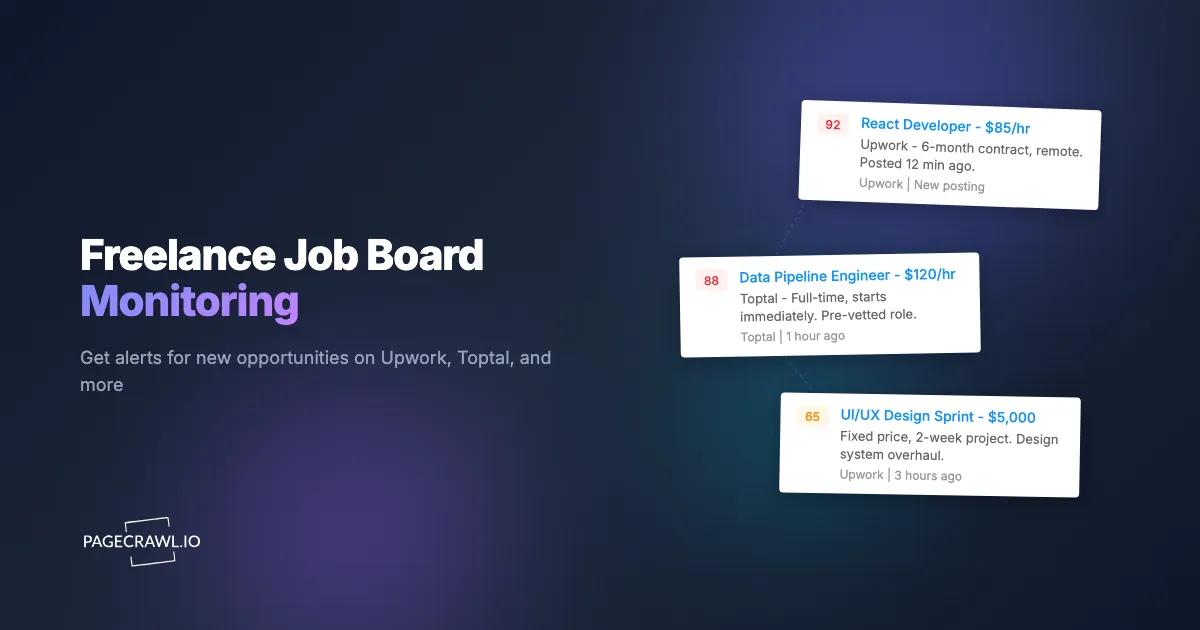
The primary use case is tracking new postings that match your skill set and rate range. On most platforms, you can construct a search URL that includes your target keywords, categories, and budget filters. When a new job appears in those results, you get an alert. For example, a React developer targeting Upwork jobs with budgets above $1,000 would set up search filters, copy the resulting URL, and monitor that page for changes.
Budget Ranges and Client Patterns
Budget information tells you whether a job is worth pursuing before you read the description. Monitoring search results filtered by budget range ensures you only see opportunities at your target price point.
Some clients post regularly and are worth tracking directly. If you have worked with a client before, or identified a company that consistently posts quality freelance work, monitoring their posting activity gives you a direct line to repeat opportunities. On Upwork, client profile pages show their posting history. On LinkedIn, company pages show new job listings.
Project Type and Scope Indicators
Ongoing projects and retainer-style engagements are often more valuable than one-off tasks. Most platforms let you filter by project length or engagement type. Set up separate monitors for different project types to prioritize your responses accordingly.
Are built-in platform alerts good enough?
Usually not, for three reasons: they run on digest schedules that lag the posting by hours, they match on broad categories rather than your exact keyword and budget combination, and they leave you juggling a separate alert system per platform. Every major freelance platform offers native notifications, but they fall short in the same three ways.
They are slow. Upwork's job alerts are typically sent via email on a digest schedule. By the time that daily summary arrives, the best postings already have dozens of proposals. The delay between posting and notification can be hours, and in freelancing, hours matter.
They lack granularity. Platform notifications offer broad category matching rather than specific keyword and filter combinations. You get alerts for "Web Development" but not for "React + TypeScript + $50-80/hr + 3-month contract." The result is a notification feed full of irrelevant postings that trains you to ignore it.
There is no cross-platform view. Monitoring six platforms means managing six alert systems with different settings, schedules, and formats. No platform gives you a unified view of opportunities across all of them.
An external monitoring tool like PageCrawl checks your saved search pages at a frequency you define (as often as every few minutes on paid plans, hourly on the free plan) and sends an alert through your preferred channel on the check that first sees the new posting. This is faster than platform digests, more customizable than platform filters, and works across every platform from a single dashboard.
Setting Up Automated Job Monitoring with PageCrawl
Here is how to configure PageCrawl to monitor freelance job boards effectively.

Step 1: Build Your Search URLs
On each platform, set up your search filters: target keywords (your core skills), minimum budget, service category, experience level, and project length. Once your filters are set, copy the full URL from your browser. This URL contains all your search parameters and is the page PageCrawl will monitor.
Step 2: Create Monitors in PageCrawl
Add each search URL as a new monitor in PageCrawl. Use "Content Only" mode, which strips away navigation, ads, and other page elements to focus on the actual job listing content. This reduces false alerts caused by sidebar changes, ad rotations, or minor UI updates that have nothing to do with new job postings.
For guidance on targeting specific sections of a page with CSS selectors (useful for isolating the job listing area from the rest of the page), see the CSS selector guide for targeted monitoring. If a sidebar or promo rail keeps firing alerts, the help article on excluding part of a page from triggering notifications shows how to cut it out of the comparison.
Step 3: Set Check Frequency
For active job hunting, set your monitors to check every 5 minutes. This is the sweet spot between catching new postings quickly and keeping your monitoring efficient. During periods where you have enough client work and are just passively watching the market, you can reduce frequency to every 30 minutes or hourly.
Step 4: Configure Alerts
Choose where you want to receive alerts. PageCrawl supports multiple notification channels:
- Email: Good for a searchable archive of job opportunities. See the email alerts setup guide for configuration details.
- Telegram: Fast push messages to your phone. Ideal for active job hunting when you want to respond within minutes. The Telegram monitoring alerts guide covers the setup process.
- Discord: Useful if you are part of a freelance community or accountability group. Share job alerts in a dedicated channel. See the Discord alerts guide.
- Webhooks: For advanced automation, use webhooks to trigger custom workflows when new jobs appear. The webhook automation guide explains how to connect PageCrawl to tools like Zapier, Make, or n8n for automated proposal drafting assistance.
For most freelancers, Telegram or email provides the best balance of speed and convenience.
Filtering Noise and Focusing on Quality Gigs
Raw job board monitoring can be noisy. Not every change to a search results page represents a valuable new opportunity. Here is how to keep your alerts focused.
Use Specific Search Filters
The most effective noise reduction happens before monitoring begins. The more specific your search URL filters, the fewer irrelevant results appear. Instead of monitoring a broad "Web Development" search, monitor "React TypeScript" with a minimum budget filter. Instead of "Writing," monitor "Technical Writing SaaS B2B" with hourly rate filters.
Create Multiple Focused Monitors
Rather than one broad monitor per platform, create several narrow ones. A React developer might have separate monitors for "React frontend" jobs, "Next.js" jobs, and "React Native" mobile jobs. Each monitor targets a specific niche, and you can prioritize alerts from the monitors that match your highest-value work.
Use AI Summaries for Quick Triage
PageCrawl's AI summaries describe what changed on the page in plain language. When a new job appears in your search results, the summary tells you what was added without requiring you to visit the page and visually scan for changes. This speeds up your triage process: read the summary, decide if the job is worth pursuing, and only click through for the ones that look promising.
Set Minimum Change Thresholds
Minor page updates (a timestamp change, a view count incrementing, an ad slot rotating) can trigger false alerts. PageCrawl's change sensitivity settings let you set a minimum threshold so that tiny text changes do not generate notifications. For job board monitoring, a moderate sensitivity threshold filters out these minor fluctuations while still catching new listings. The complete guide to reducing false positive notifications walks through the other filters worth turning on.
Monitoring Client Profiles and Repeat Posters
Some of the best freelance work comes from repeat clients and companies with a track record of posting quality jobs.
After working on a platform for a while, you develop a sense for which clients are worth pursuing. They have clear requirements, fair budgets, good communication, and positive reviews. When you spot one, bookmark their profile page and create a PageCrawl monitor for it.
When a monitored client posts a new job, the next check picks it up, often before the posting gains visibility in broader search results. This is particularly valuable for past clients. A quick message referencing your prior work together, submitted within minutes of a new posting, puts you at the front of the line for repeat engagements.
Some companies use freelance platforms as an ongoing talent pipeline, posting new projects every few weeks. Monitoring their company pages or search results filtered to their name ensures you catch every opportunity from these consistent sources.
Building a Freelance Job Hunting Workflow
Monitoring alone does not win contracts. It needs to be part of a structured workflow that moves from alert to proposal to engagement.
Morning Review Routine
Even with fast alerts, a daily review helps you stay strategic. Each morning, review the previous day's alerts in aggregate. Look for patterns: are certain types of jobs appearing more frequently? Are budgets trending up or down in your niche? Is a particular client posting multiple roles? This context informs your positioning and rate decisions.
Response Templates
Prepare proposal templates for your most common job types. When an alert comes in, you should not be writing from scratch. Have a base template that covers your relevant experience and approach, then customize the opening paragraph for each specific job (reference their project details, ask a relevant question).
Prioritization Framework
Not every alert deserves a drop-everything response. Build a simple system:
- Respond right away (within 15 minutes): Jobs matching your ideal client profile, budget, and skill set perfectly.
- Respond same day: Good matches that require a more thoughtful proposal or research into the client.
- Save for later: Interesting opportunities without urgency, such as longer-term projects.
- Skip: Jobs that appeared due to keyword overlap but are not a good fit.
Track and Refine
Keep a simple spreadsheet of jobs you apply to, when the alert came in, when you responded, and whether you got the contract. Over time, this data reveals which platforms, filters, and response times produce the best results. Use it to refine your monitoring setup.
Use different notification channels for different urgency levels. For high-priority monitors, send alerts to Telegram for fast push messages. For broader searches, use email digests. This prevents notification fatigue while ensuring the best opportunities get your fastest attention.
Choosing your PageCrawl plan
PageCrawl's Free plan lets you monitor 6 pages with 220 checks per month, which is enough to validate the approach on your most critical pages. Most teams graduate to a paid plan once they see the value.
| Plan | Price | Pages | Checks / month | Frequency |
|---|---|---|---|---|
| Free | $0 | 6 | 220 | every 60 min |
| Standard | $8/mo or $80/yr | 100 | 15,000 | every 15 min |
| Enterprise | $30/mo or $300/yr | 500 | 100,000 | every 5 min |
| Ultimate | $99/mo or $999/yr | 1,000 | 100,000 | every 2 min |
Annual billing saves two months across every paid tier. Enterprise and Ultimate scale up to 100x if you need thousands of pages or multi-team access.
A single extra contract is all it takes. Standard at $80/year covers 100 monitored searches across every platform you work on, checking every 15 minutes so new postings hit your phone while most freelancers are still manually refreshing. If getting one proposal in front of a client 30 minutes earlier than you otherwise would wins you a project you would have lost, the plan pays for itself before the first billing cycle ends.
How do you get started monitoring freelance job boards?
Start with two or three platforms and one filtered search on each, then give the setup a week before you tune it. Pick two or three freelance platforms where you do most of your work. On each platform, set up a filtered search with your target keywords, budget range, and project type. Copy each search URL and create a PageCrawl monitor in "Content Only" mode with 5-minute check intervals. Connect your preferred notification channel (Telegram for speed, email for a searchable archive) and run the monitors for a week.
During that first week, pay attention to the alert quality. If you are getting too much noise, tighten your search filters or adjust the change sensitivity threshold. If you are missing relevant jobs, broaden your keywords slightly or add monitors for additional search variations.
Once calibrated, this system runs continuously in the background. New jobs matching your criteria trigger an alert within minutes of posting, giving you the early-responder advantage that consistently wins freelance contracts.
PageCrawl's free tier includes 6 monitors, enough to cover filtered searches on two to three platforms. Paid plans start at $8/month for 100 monitors and $30/month for 500 monitors, providing capacity to cover multiple platforms, skill categories, and client profiles across your entire freelance business.