A 0.25% difference in your mortgage rate on a $400,000 loan changes your monthly payment by roughly $60, which works out to somewhere around $20,000 in extra interest across a 30-year term. That is not a rounding error. It is a used car.
Mortgage rates move daily, sometimes multiple times per day. The rate your lender quoted last Thursday is not the rate available today. Major economic announcements, Federal Reserve decisions, employment reports, and inflation data all push rates up or down. In volatile periods, rates can swing by a quarter point or more within a single week.
Most borrowers check rates manually, visiting a few lender websites when they remember. This approach misses rate dips that last hours or days before correcting. It misses lender-specific promotions that appear briefly. And it requires constant discipline to keep checking during what might be a months-long home search or refinance consideration period.
This guide covers how mortgage rates work, what drives rate changes, which sources to monitor, how to set up automated rate tracking with threshold alerts, and strategies for comparing rates across lenders systematically.
How do mortgage rates actually get set?
Your quoted rate is the bond market's baseline plus the lender's own margin, adjusted for your personal profile and any points you pay. That is why two lenders can quote different rates on the same morning to the same borrower. Understanding these mechanics helps you monitor effectively and act at the right moment.
What Determines Your Rate
The mortgage rate you are offered depends on multiple factors:
Market rates. The baseline comes from the bond market, specifically the yield on 10-year Treasury notes. When Treasury yields rise, mortgage rates generally follow. When yields fall, mortgage rates tend to decline. This connection is not instant or exact, but it drives the overall direction.
Federal Reserve policy. The Fed does not set mortgage rates directly, but its decisions on the federal funds rate and bond purchasing programs heavily influence the rate environment. When the Fed signals rate cuts, mortgage rates often decline in anticipation. When the Fed tightens, rates rise.
Lender margin. Each lender adds their profit margin (called the spread) on top of market rates. This margin varies between lenders and is where comparison shopping provides the most direct savings. Two lenders operating in the same market might offer rates that differ by 0.125% to 0.5% on the same day for the same borrower.
Your personal profile. Credit score, down payment amount, loan type, property type, and loan amount all affect the rate you qualify for. Published rates are often "best case" scenarios that assume excellent credit and substantial down payment.
Points and fees. Mortgage rates can be adjusted by paying points (upfront fees that buy a lower rate) or accepting lender credits (a higher rate in exchange for reduced closing costs). The advertised rate without context about points is incomplete information.
Fixed vs Adjustable Rates
Fixed-rate mortgages lock your interest rate for the entire loan term. They are straightforward to monitor because the quoted rate is the rate you pay. The 30-year fixed rate is the most commonly cited mortgage rate benchmark.
Adjustable-rate mortgages (ARMs) start with a lower initial rate that adjusts periodically after a fixed period. Monitoring ARM rates is relevant during the initial rate-shopping phase, but the long-term cost depends on future rate movements that cannot be predicted.
For most rate monitoring purposes, the 30-year fixed rate serves as the primary benchmark, with 15-year fixed and ARM rates as secondary considerations.
Rate Locks and Timing
When you find a rate you like, you can lock it for 30 to 60 days (sometimes longer). During the lock period, your rate does not change even if market rates move. Rate locks expire, though, so timing matters. Lock too early and you might miss a further decline. Lock too late and rates might rise.
Monitoring helps you time your lock. If you see rates trending down, you might wait. If rates spike up after a period of decline, you know the window may be closing.
Which mortgage rate sources should you monitor?
Pick one aggregate benchmark for market direction and two or three lenders you would genuinely borrow from. The benchmark tells you where the market is heading; the lender pages tell you what you can actually lock. Different sources provide different perspectives on the rate environment.
Aggregate Rate Surveys
Freddie Mac Primary Mortgage Market Survey. Published weekly on Thursday mornings, the Freddie Mac PMMS is the most widely cited mortgage rate benchmark. It surveys lenders nationally and provides average rates for the main fixed and adjustable products. This tells you the national trend but not what any specific lender will offer you.
Bankrate National Average. Bankrate publishes daily average mortgage rates compiled from lender surveys. More frequent than Freddie Mac, it captures rate movements within the week. The Bankrate rate table page is well-structured for automated monitoring.
NerdWallet Rate Tracker. NerdWallet aggregates rates from partner lenders and displays current averages alongside historical charts. Their rate page includes multiple loan types and term lengths.
Individual Lender Rate Pages
Major lenders publish their current rates on their websites:
- Wells Fargo, Chase, Bank of America, and US Bank update rates daily
- Online lenders like Better, Rocket Mortgage, and loanDepot often display rates prominently
- Credit unions and regional lenders publish competitive rates for their service areas
Monitoring individual lender pages gives you specific, actionable rates rather than national averages. The rate on Wells Fargo's website is (approximately) the rate they will offer you, subject to your personal qualifications.
Economic Indicators
Mortgage rates react to economic data releases, so monitoring government agencies and public records pages such as the Federal Reserve, the Treasury, and the Bureau of Labor Statistics provides leading indicators:
- Federal Reserve announcements: FOMC meeting decisions and meeting minutes
- Employment data: Monthly jobs report (first Friday of each month)
- Inflation data: CPI and PCE reports
- Treasury yields: 10-year Treasury note yield as a direct rate driver
While you would not set a mortgage rate alert based on employment data, understanding these relationships helps you anticipate rate movements.
Method 1: Manual Checking
The simplest approach, and the one most people use.
How It Works
Visit Bankrate, NerdWallet, or your preferred lender's website. Note the current rate. Repeat periodically.
Pros
- No setup required
- Free
- You see exactly what the website shows
Cons
- Requires discipline and time
- Easy to miss short-lived rate dips
- No historical tracking unless you record rates yourself
- No alerts when rates hit your target
- Comparison across lenders is tedious
Best For
People who check rates casually and are not time-sensitive about their purchase or refinance decision.
Method 2: Lender Alerts
Some lenders and rate aggregators offer email notifications.
How It Works
Sign up on Bankrate, NerdWallet, or lender websites to receive rate alerts. They email you when rates change significantly or hit a threshold you specify.
Pros
- Automated, no manual checking required
- Some offer threshold-based alerts
- Free from most providers
Cons
- Email-only notifications (slow delivery)
- Limited customization of alert criteria
- You get the alerts the provider wants to send, not necessarily when rates change
- Many rate alert services are thinly disguised lead generation (your contact info goes to lenders who then call you)
- Cannot monitor specific lender pages for their exact rates
Best For
Borrowers who want basic awareness without setup complexity and do not mind receiving sales calls from lenders.
Method 3: Web Monitoring for Mortgage Rates
Automated web monitoring provides precise, customizable rate tracking across any source that publishes rates online, from lender mortgage pages to bank savings and CD rate changes on the deposit side.

How It Works with PageCrawl
PageCrawl monitors mortgage rate pages in a real browser, extracting specific rate values and alerting you when they change or hit your target. Here is a detailed setup.
Step 1: Choose your sources. Select 3 to 5 rate pages to monitor. A good combination includes one aggregate source (Bankrate or NerdWallet) for market overview and two to three specific lenders you would actually work with. Monitoring both gives you market context and actionable, lender-specific rates.
Step 2: Add rate page URLs. For each source, add the specific page URL that displays current mortgage rates. For Bankrate, this is their mortgage rates page. For individual lenders, find the page that shows current rates without requiring you to submit personal information first.
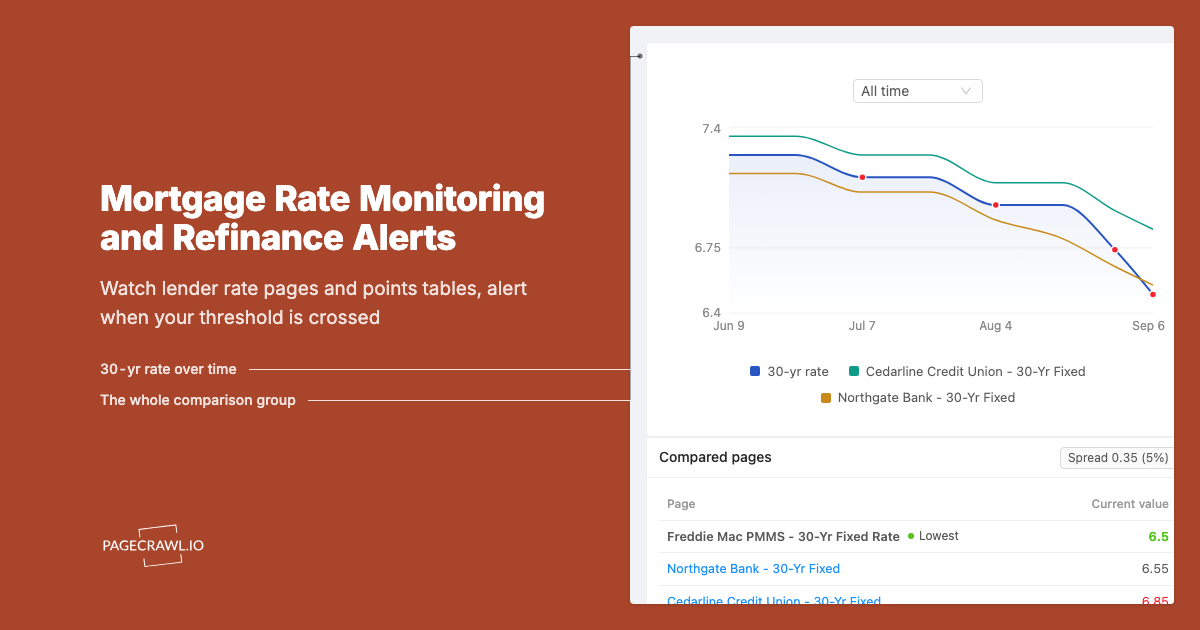
Step 3: Select number tracking mode. PageCrawl's number tracking mode extracts numerical values from the page and charts them over time. For mortgage rates, this captures the rate figure (like 6.75%) and tracks changes to that specific number, the same mechanism behind price monitoring and drop alerts on retail pages. This is more precise than full-page monitoring, which would alert on every content change including ads and article text.
Alternatively, use CSS selectors to target the exact rate element on the page. Rate tables typically use consistent HTML structures that CSS selectors target reliably.
Step 4: Set check frequency. Mortgage rates do not change by the minute. Checking every 6 hours (4 times daily) captures meaningful rate movements without excessive checks. During volatile periods (Fed meeting weeks, major economic releases), increase to every 2 hours.
For daily rate surveys like Bankrate, checking twice daily (morning and evening) suffices. For individual lender pages that update throughout the day, every 4 to 6 hours provides good coverage.
Step 5: Configure threshold-based alerts. This is where mortgage rate monitoring becomes powerful. Instead of getting notified every time the rate changes by 0.01%, set a target rate threshold. For example: alert me when the 30-year fixed rate drops below 6.25%.
PageCrawl's number tracking detects the rate value and alerts you when it crosses your threshold. Notification conditions and filters let you set that rule per monitor, so you hear about rates only when they reach your target, not on every minor fluctuation.
Step 6: Set up notifications. For mortgage rate monitoring, email works fine for most people since you do not need to act within seconds. Rates that drop to your target will likely remain there for at least a day. Add Telegram or Slack as a secondary channel if you want faster awareness.
For borrowers actively in the market and ready to lock, faster notifications help. A rate dip might last only a day before correction. Telegram push notifications ensure you see it promptly.
Webhook notifications are valuable if you want to feed rate data into a spreadsheet or custom dashboard for historical tracking.
Monitoring Multiple Lenders Simultaneously
The most valuable use of rate monitoring is comparing across lenders. Set up identical monitoring for 3 to 5 lenders:
- Same loan type (30-year fixed) across all monitors
- Same check frequency for consistent comparison
- Webhook output to a central spreadsheet or database
This creates an automated rate comparison that updates throughout the day. When one lender drops their rate below competitors, you see it on the next check rather than the next time you remember to look. Lender-specific promotions and competitive pricing become visible without visiting each site manually.
PageCrawl's templates let you save a monitoring configuration (tracking mode, check frequency, notification channels, noise filters) and apply it to new monitors with one click. Create a "Mortgage Rate Monitor" template with number tracking mode, 6-hour frequency, and your preferred notification channels, then apply it whenever you add a new lender to your comparison set. This saves setup time and ensures all your rate monitors use consistent settings.
Setting Up a Rate Tracking Dashboard
For borrowers who want historical context, combine PageCrawl monitoring with data storage:
- Configure webhook output for each rate monitor
- Use n8n or a similar automation tool to receive webhooks and log data
- Store rate values with timestamps in a spreadsheet or database
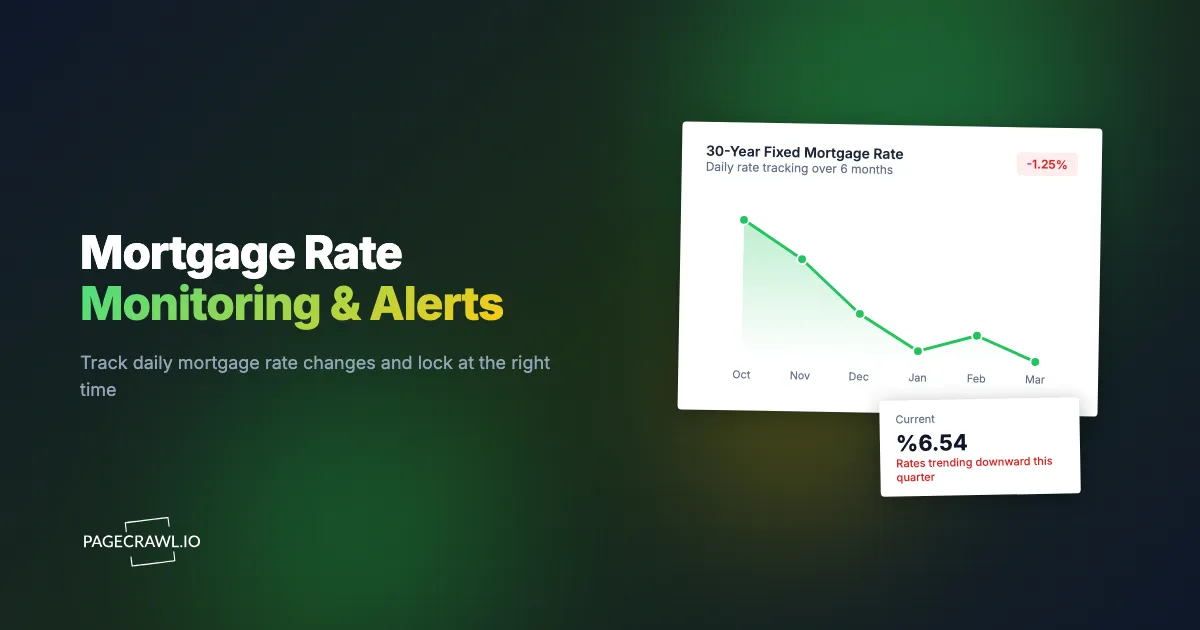
- Visualize trends over time to identify optimal locking windows
This approach builds your own rate history database, showing not just today's rates but how they have trended over weeks and months. Combined with economic calendar awareness, this helps you make informed rate lock timing decisions.
Strategies for Homebuyers
Homebuyers face the challenge of coordinating rate monitoring with the unpredictable timeline of finding and closing on a home.
Start Monitoring Early
Begin rate monitoring when you start your home search, not when you find a house. Understanding the rate environment over months gives you context that new buyers lack. You will know whether today's rate is historically low, trending down, or spiking up.
Set a Realistic Target
Research current rates on Freddie Mac or Bankrate to understand the baseline. Set your target rate slightly below current levels. If the 30-year fixed averages 6.5% today, setting a target of 6.25% is reasonable. Setting a target of 4.5% (well below current levels) means you may never get an alert.
Adjust your target as the market moves. If rates trend down over months, lower your target. If they trend up, reassess whether waiting for a specific rate is costing you housing opportunities.
Rate Lock Strategy
When your alert fires and rates hit your target:
- Contact your lender immediately (or multiple lenders for final comparison)
- Get a formal rate quote in writing (Good Faith Estimate or Loan Estimate)
- Lock the rate if it matches your target
- Standard rate locks are 30 to 60 days, so ensure your closing timeline fits
If you are pre-approved but still house hunting, some lenders offer extended rate locks (90 to 120 days) for an additional fee. This protects your rate while you continue searching.
Strategies for Refinancing
Refinancers have different timing flexibility than buyers.
Calculate Your Breakeven Point
Before monitoring rates, calculate the rate reduction needed to justify refinancing. Closing costs on a refinance typically run into the low thousands, often somewhere around $3,000 to $6,000 depending on loan size and state. If your monthly payment drops by $100 and your costs are $4,000, you need roughly 40 months to break even.
Use this calculation to set your target rate. If you currently have a 7.0% mortgage, refinancing at 6.5% might not save enough to justify costs if you plan to move in three years. But refinancing at 6.0% might make sense if you are staying long-term.
Monitor Your Current Lender Plus Competitors
Your existing lender may offer streamlined refinancing with reduced costs. Monitor their rate page specifically. But also monitor competitors, as a lower rate elsewhere might justify the full refinancing process even with higher costs.
Cash-Out Refinance Rates
If you are considering a cash-out refinance (borrowing more than your current balance to access equity), monitor cash-out specific rates. These are typically 0.125% to 0.25% higher than standard refinance rates and are listed separately on many lender websites.
Comparing Rates Accurately
Published rates require context to compare fairly.
APR vs Interest Rate
The Annual Percentage Rate (APR) includes fees and points, making it a more complete cost comparison than the interest rate alone. Some lenders advertise low rates that come with high points (upfront fees). The APR reveals the true cost, and the Consumer Financial Protection Bureau publishes free tools explaining how to read a Loan Estimate line by line. Always confirm the final figures with the lender in writing; this article is informational, not financial advice.
When monitoring rates, try to capture both the interest rate and APR if the page displays them. If you can only track one number, APR provides a more apples-to-apples comparison across lenders.
Points and Credits
A lender offering 6.25% with 1 point (1% of the loan amount paid upfront) is not truly cheaper than a lender offering 6.5% with no points, unless you plan to keep the loan long enough for the monthly savings to offset the upfront cost.
When comparing monitored rates, note whether the published rate includes points. Many rate table pages display this information, and you can target the points column with additional element monitors.
Loan Type Consistency
Compare the same loan type across lenders. A 30-year fixed rate from one lender should be compared to 30-year fixed from another. Mixing 30-year, 15-year, and ARM rates in comparisons produces meaningless results.
When should you check rates more often?
Around scheduled economic events. Fed meeting weeks, the monthly jobs report, and major geopolitical shocks all move bond yields, and mortgage rates follow within hours. Tightening your check interval during those windows costs little and catches dips that a once-a-day routine misses.
Federal Reserve Meeting Weeks
The Federal Reserve holds eight scheduled FOMC meetings a year, and each one can produce rate movements. Markets often price in expected decisions before the announcement, then react to the actual decision and press conference. Rates can move significantly on meeting days.
Increase monitoring frequency to every 2 hours during FOMC weeks. If you are close to your target rate, daily movement during these periods might push rates to your threshold temporarily.
Employment Report Days
The monthly jobs report from the Bureau of Labor Statistics, usually released on the first Friday of the month, moves bond markets and, consequently, mortgage rates. A stronger than expected report tends to push rates up. A weaker report tends to push rates down.
If rates are near your target, pay extra attention around the jobs report release at 8:30 AM Eastern on report days.
Geopolitical Events
Major geopolitical events create flight-to-safety dynamics that push investors toward Treasury bonds, which lowers yields and, typically, mortgage rates. During periods of global uncertainty, rate dips can be sudden and significant.
Automated monitoring catches these event-driven dips that manual checking might miss if they occur during off-hours or when you are focused on other things.
What are the most common rate monitoring mistakes?
Four show up repeatedly: reacting to noise, waiting for a bottom that never announces itself, judging a rate in isolation from the rest of the deal, and tracking so many sources that none of them get read. Each one is easy to avoid once you name it.
Obsessing Over Small Movements
Daily rate fluctuations of 0.01% to 0.05% are noise. They do not meaningfully affect your mortgage cost. Set your monitoring thresholds to filter out minor movements and only alert on significant changes (0.125% or more, or when crossing your target rate).
Waiting for the Perfect Bottom
Rates do not announce when they have hit bottom. Borrowers who wait for rates to drop "just a little more" sometimes see rates reverse and rise, missing the window entirely. Set a target rate that meets your financial needs and lock when you hit it. Trying to time the absolute bottom is speculation, not strategy.
Ignoring the Full Cost Picture
The mortgage rate is one component of your housing cost. A lower rate is meaningless if the house price is above your budget or closing costs eat your savings. Rate monitoring should inform your broader financial decision, not drive it in isolation.
Monitoring Too Many Sources
Monitoring 20 lender websites creates information overload without proportional benefit. Three to five sources provide sufficient market coverage: one aggregate (Bankrate or NerdWallet), your current lender, and two to three competitors. Focus your monitoring quota on quality sources rather than quantity.
Choosing your PageCrawl plan
PageCrawl's Free plan lets you monitor 6 pages with 220 checks per month, which is enough to validate the approach on your most critical pages. Most teams graduate to a paid plan once they see the value.
| Plan | Price | Pages | Checks / month | Frequency |
|---|---|---|---|---|
| Free | $0 | 6 | 220 | every 60 min |
| Standard | $8/mo or $80/yr | 100 | 15,000 | every 15 min |
| Enterprise | $30/mo or $300/yr | 500 | 100,000 | every 5 min |
| Ultimate | $99/mo or $999/yr | 1,000 | 100,000 | every 2 min |
Annual billing saves two months across every paid tier. Enterprise and Ultimate scale up to 100x if you need thousands of pages or multi-team access.
On a $400,000 mortgage, a quarter-point rate difference is worth around $20,000 in interest over the life of the loan. Standard at $80/year pays for itself many times over if monitoring helps you spot a brief rate dip and lock before it corrects. 100 pages covers the rate pages for every lender you would realistically work with, plus aggregate benchmarks like Bankrate and Freddie Mac, all checked every 15 minutes. Mortgage brokers and financial professionals comparing rates for multiple clients will find Enterprise at $300/year more appropriate, with 500 pages and 5-minute check frequency for the most time-sensitive rate windows.
All plans include the PageCrawl MCP Server, so you can ask Claude to summarize how a specific lender's rates have moved over the past month and pull the data straight from your monitoring history. AI assistants can create monitors through conversation on every plan, including Free.
Getting Started
Mortgage rates affect your largest financial obligation, and the difference between a good rate and a great rate compounds over decades. Automated monitoring removes the burden of manual checking while ensuring you never miss a rate that meets your target.
Start simple. Monitor Bankrate's rate page for overall market direction and your preferred lender's rate page for actionable quotes. Set your check frequency to every 6 hours. Configure a target rate alert so you only get notified when rates reach your goal, not on every minor fluctuation.
PageCrawl's free tier includes 6 monitors, enough to track 3 aggregate rate sources and 3 specific lenders simultaneously. For borrowers comparing many lenders or tracking multiple loan products, the Standard plan at $80/year supports 100 monitors, and the Enterprise plan at $300/year covers 500 monitors for mortgage brokers and financial professionals managing multiple client rate targets.
Number tracking mode with threshold alerts is built for exactly this kind of monitoring. Tell PageCrawl the rate you want, and it tells you when that rate exists. No daily checking. No missed opportunities. No lender lead generation calls.
Create a free PageCrawl account and start tracking mortgage rates today.