Both web scraping and web monitoring involve fetching data from websites automatically. But they solve fundamentally different problems, and using the wrong approach wastes time, money, and engineering resources. Web scraping extracts data. Web monitoring detects changes. Knowing which you need determines everything about your technical approach, legal exposure, infrastructure costs, and maintenance burden.
This guide breaks down exactly when each approach makes sense, where they overlap, and how to decide which one (or both) you need.
What Is Web Scraping?
Web scraping is the automated extraction of structured data from websites. You write code (or use a tool) that visits web pages, parses the HTML, extracts specific data points, and stores them in a database or file.
Common Web Scraping Use Cases
- Price aggregation: Collecting prices from dozens of e-commerce sites into a comparison database
- Lead generation: Extracting business contact information from directories
- Research datasets: Building training data for machine learning models from public web content
- Market analysis: Pulling product catalogs, reviews, or listings from multiple platforms
- Content aggregation: Collecting articles, reviews, or posts from across the web
How Web Scraping Works
A typical scraping pipeline:
- Send an HTTP request to a web page
- Receive the HTML response
- Parse the HTML to find target elements (using CSS selectors, XPath, or regex)
- Extract the data values from those elements
- Clean and transform the extracted data
- Store the data in a database, spreadsheet, or file
- Repeat for the next page or URL
Web Scraping Technology Stack
Simple scrapers:
- Python with Beautiful Soup or Scrapy
- Node.js with Cheerio or Puppeteer
- PHP with Goutte or Symfony DomCrawler
Browser-based scrapers (for JavaScript-rendered sites):
- Selenium, Playwright, or Puppeteer controlling a headless browser
- Splash (lightweight browser for scraping)
Commercial scraping platforms:
- ScrapingBee, Bright Data, Apify, Octoparse
- These handle proxies, CAPTCHAs, and browser rendering
What Is Web Monitoring?
Web monitoring is the automated detection of changes on web pages over time. Instead of extracting all data from a page, monitoring compares the current version of a page to a previous version and alerts you when something is different.
Common Web Monitoring Use Cases
- Competitor tracking: Getting alerts when a competitor changes their pricing, features, or messaging
- Compliance: Monitoring regulatory pages, terms of service, or policy documents for changes
- Security: Detecting unauthorized changes to your own website (defacement monitoring)
- Price tracking: Getting alerted when a specific product's price drops
- Availability alerts: Knowing when an out-of-stock product becomes available
- Documentation tracking: Monitoring API docs or software documentation for updates
- Research: Tracking when government data, court filings, or public records are updated
How Web Monitoring Works
A typical monitoring pipeline:
- Fetch a web page and capture its content (text, HTML, or screenshot)
- Store this snapshot as the baseline
- Wait for a specified interval (minutes, hours, or days)
- Fetch the page again
- Compare the new version to the stored version
- If changes are detected, analyze the difference
- Send an alert with the change details (often with an AI summary)
- Update the stored version for the next comparison
Web Monitoring Technology Stack
DIY monitoring:
- Cron jobs running diff commands against saved HTML files
- Custom scripts that hash page content and compare hashes
- GitHub Actions that periodically check pages
Monitoring platforms:
- PageCrawl (AI-powered change detection with multiple tracking modes)
- Visualping (visual comparison focus)
- Distill.io (browser extension plus cloud)
- ChangeTower (archiving focus)
Key Differences
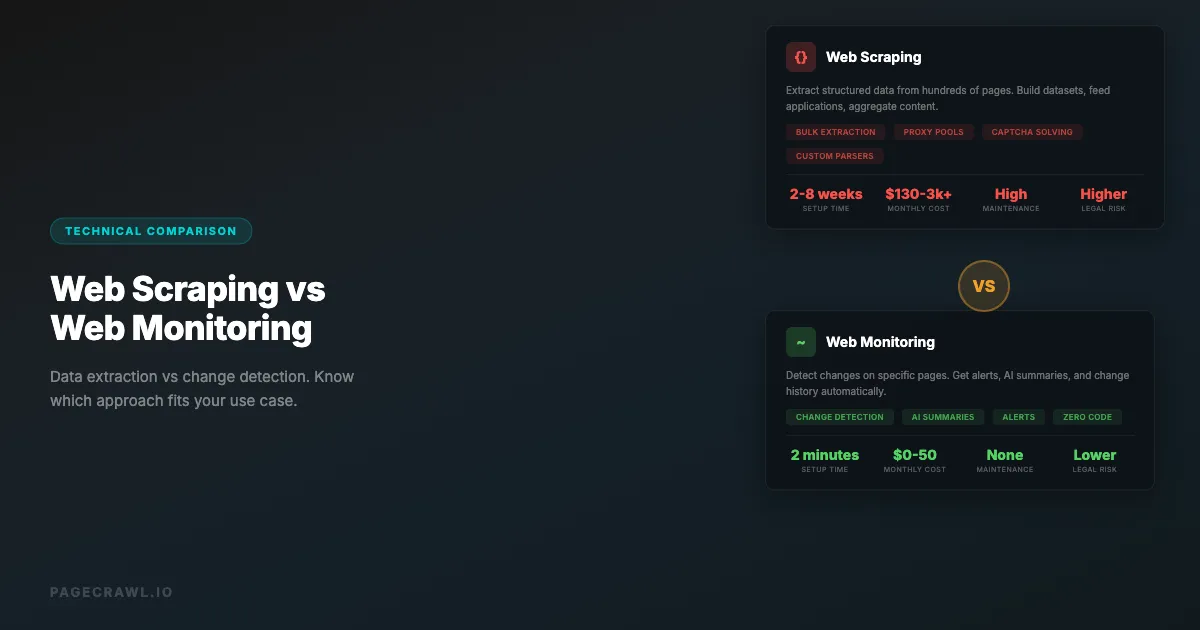
| Aspect | Web Scraping | Web Monitoring |
|---|---|---|
| Primary goal | Extract data | Detect changes |
| Output | Structured datasets | Change notifications |
| Frequency | One-time or periodic bulk | Continuous on schedule |
| Data volume | High (many pages, many data points) | Low (same pages, only changes) |
| Storage | Large databases of extracted data | Change history and snapshots |
| Maintenance | High (selectors break often) | Low to medium (monitoring tools handle this) |
| Anti-bot risk | High (many requests, data extraction patterns) | Low (periodic single-page fetches) |
| Legal risk | Higher (data extraction, copying) | Lower (viewing public pages) |
| Infrastructure | Proxy pools, CAPTCHA solving, IP rotation | Simple scheduled checks |
| Time to value | Days to weeks (building pipeline) | Minutes (set up a monitor) |
When to Use Web Scraping
You Need Bulk Data Extraction
If your goal is to collect data from hundreds or thousands of pages, you need scraping. Web monitoring checks individual pages for changes. Scraping builds datasets. That said, if you need lightweight, ongoing data extraction from a handful of pages, you can often turn a website into an API using a monitoring tool instead of building a full scraper.
Example: Building a price comparison site that shows prices for 50,000 products across 20 retailers. You need to extract every product name, price, availability status, and image URL. This is a scraping problem.
You Need Structured Data Output
Scraping produces structured data (CSV, JSON, database rows). If you need data in a format that feeds into an application, analysis tool, or machine learning pipeline, scraping is the right approach.
Example: Collecting all job listings from 10 job boards into a unified database that powers your job search application. Each listing needs to be parsed into title, company, salary, location, and requirements fields.
You Need Data from Many Different Pages
When you need to crawl across an entire site (or many sites) extracting the same data points from each page, that is scraping. Monitoring is designed for watching specific URLs, not crawling entire sites.
Example: Extracting all product reviews from an e-commerce platform to analyze customer sentiment across thousands of products.
You Are Building a Product That Depends on External Data
If your business model requires continuously ingesting data from other websites, you are building a scraping pipeline. This includes price comparison sites, aggregator platforms, market intelligence tools, and data providers.
When to Use Web Monitoring

You Care About Changes, Not Raw Data
If you already know what information is on a page and just want to know when it changes, monitoring is the right tool. You do not need to extract and store all the data, you just need to be alerted when something is different.
Example: Monitoring your competitor's pricing page. You do not need to extract every price into a database. You need to know when any price changes so you can respond.
You Need Alerts and Notifications
Web monitoring is built around notifications. When something changes, you get a Slack message, email, or webhook. Scraping pipelines require custom notification logic built on top.
Example: Getting a Slack alert as soon as a check detects that a government regulatory page has been updated, so your compliance team can review the changes.
You Want AI-Powered Change Analysis
Modern monitoring tools like PageCrawl use AI to summarize what changed and why it matters. This level of analysis does not exist in scraping tools because scraping is about data extraction, not interpretation.
Example: Monitoring an API documentation page and getting an AI summary like "the rate limit for the /users endpoint was increased from 100 to 500 requests per minute, and a new /users/search endpoint was added."
You Need Low Maintenance
Monitoring tools handle the complexity of fetching pages, dealing with JavaScript rendering, removing cookie banners, comparing content, and sending alerts. Once set up, they run without intervention. Scraping pipelines break constantly and require ongoing maintenance.
Example: A marketing team that wants to know when a competitor updates their website. They do not have engineering resources to build and maintain a scraping pipeline.
You Are Watching a Small Number of Pages
If you are tracking fewer than a few hundred specific URLs, monitoring is more efficient than scraping. Monitoring tools are optimized for this use case with per-URL configuration, notification rules, and change history.
When to Use Both
Some use cases benefit from combining scraping and monitoring.
Price Intelligence
Use scraping to build your initial price database (extracting prices from thousands of products). Then use monitoring on the most important products to get an alert as soon as a check detects a price change.
Scraping: Extract prices from 10,000 products daily, store in database. Monitoring: Set up alerts on the 50 most important products with PageCrawl price tracking, with checks running as often as every 2 minutes.
Competitive Intelligence
Use scraping to build a snapshot of a competitor's product catalog or feature set. Then use competitive intelligence monitoring to detect when they add, remove, or change products and features.
Scraping: Quarterly full extraction of competitor product catalogs. Monitoring: Continuous change detection on competitor pricing pages, feature pages, and blog.
Research and Compliance
Use scraping to collect the initial corpus of documents (regulations, policies, legal filings). Then use monitoring to detect when any of those documents are updated.
Scraping: Extract all current regulatory documents into a searchable archive. Monitoring: Watch each regulatory page for changes and get AI-powered summaries of updates.
Legal Considerations
Web Scraping Legal Risks
Web scraping exists in a legal gray area. Key considerations:
- Terms of service: Many websites explicitly prohibit automated data collection. Violating ToS can lead to account termination and in some jurisdictions, legal action.
- Copyright: Extracting and republishing copyrighted content (articles, images, reviews) can infringe copyright even if the source is publicly accessible.
- Computer fraud laws: Aggressive scraping that bypasses technical barriers (CAPTCHAs, rate limits, IP blocks) can potentially violate computer fraud laws in some jurisdictions.
- Data protection: Scraping personal data (names, emails, phone numbers) may violate the GDPR, the California Consumer Privacy Act, or other privacy regulations.
- hiQ Labs v. LinkedIn: In its 2022 decision, the Ninth Circuit held that scraping publicly available data does not violate the CFAA, but that reasoning only reaches truly public data and the legal landscape continues to evolve.
Web Monitoring Legal Position
Web monitoring has a stronger legal standing because:
- No data extraction: Monitoring checks for changes, it does not extract and republish data.
- Low request volume: Monitoring makes periodic single-page requests, not bulk crawling.
- Public pages: Monitoring typically watches publicly accessible pages, similar to a human checking a webpage manually.
- No bypassing access controls: Legitimate monitoring does not work around authentication or access restrictions. Monitoring password-protected pages requires your own authorized credentials, which you supply to the monitor yourself.
That said, monitoring is not entirely without legal consideration. Monitoring a competitor's password-protected pricing portal using credentials you obtained without authorization would be problematic regardless of whether you call it "monitoring" or "scraping."
Technical Complexity Comparison
Building a Web Scraper
A production-quality scraping pipeline requires:
- Proxy management: Rotating IP addresses to avoid blocks. Commercial proxy pools cost $50-500+/month.
- CAPTCHA solving: Integrating CAPTCHA-solving services ($1-3 per 1,000 CAPTCHAs).
- JavaScript rendering: Running headless browsers for SPAs. Resource-intensive and slow.
- Selector maintenance: When websites redesign, selectors break. Expect to fix scrapers monthly.
- Rate limiting: Respecting (or evading) rate limits without getting blocked.
- Data cleaning: Raw scraped data is messy. Expect significant post-processing.
- Error handling: Network timeouts, changed page structures, missing elements, anti-bot challenges.
- Scheduling: Running scraping jobs on a schedule, handling failures and retries.
- Storage: Database design for storing and querying scraped data efficiently.
- Monitoring the scraper: Ironically, you need to monitor your scraper to know when it breaks.
Realistic development time: 2-8 weeks for a production-quality scraper. Ongoing maintenance: 4-8 hours per month per scraper.
Setting Up Web Monitoring
A monitoring workflow requires:
- Enter the URL you want to monitor
- Choose what to track from the available tracked element types (full page text, specific element, price, visual appearance)
- Set check frequency
- Configure notifications
- Done
Realistic setup time: 2-5 minutes per monitor. Ongoing maintenance: near zero (the monitoring tool handles rendering, comparison, and delivery).
Cost Comparison
Web Scraping Costs
| Component | Monthly Cost |
|---|---|
| Proxy service (residential) | $50-500+ |
| CAPTCHA solving | $10-100 |
| Server infrastructure | $20-200 |
| Developer maintenance time | $500-2,000 (4-8 hours) |
| Scraping platform (if using one) | $50-500 |
| Total | $130-3,300+/month |
Note: those are ballpark ranges based on typical vendor list prices rather than a published benchmark, so price your own stack before budgeting.
Web Monitoring Costs
| Component | Monthly Cost |
|---|---|
| Monitoring service | $0-50 (free tiers available) |
| Developer time | $0 (no maintenance) |
| Total | $0-50/month |
The cost difference is stark for simple use cases. Scraping only becomes cost-effective when you need the volume of data extraction that monitoring cannot provide.
Performance and Reliability
Scraping Challenges
- Blocking: Websites actively detect and block scrapers. Your scraper might work today and fail tomorrow.
- Rate limiting: Aggressive scraping triggers rate limits. Respecting limits means slower data collection.
- Dynamic content: JavaScript-rendered pages require headless browsers, which are far slower and far more resource-hungry than a simple HTTP request.
- Anti-bot evolution: Anti-bot systems continuously improve bot detection. Scrapers need constant updates.
Monitoring Advantages
- Low profile: A single page check every few hours looks like a normal user visit. Monitoring services rarely get blocked.
- Built-in bot protection handling: Tools like PageCrawl automatically handle access challenges built into modern websites, including the 403 access denied errors that often block DIY scripts.
- Managed infrastructure: A managed monitoring service handles the underlying infrastructure complexity that self-hosted open-source change detection tools leave to you.
- Historical accuracy: Monitoring tools maintain consistent comparison baselines, reducing false positives from transient page variations.
Should you choose scraping, monitoring, or both?
Choose scraping when you need the data itself from many pages, monitoring when you need to know that a specific page changed, and both when you need a bulk dataset plus ongoing awareness. Match the tool to the question you are actually asking.
Choose web scraping if:
- You need to extract data from hundreds or thousands of pages
- You are building a product that requires continuous data ingestion
- You need structured datasets for analysis or machine learning
- You have engineering resources for ongoing maintenance
- The volume of data justifies the infrastructure cost
Choose web monitoring if:
- You want alerts when specific pages change
- You are tracking competitors, prices, compliance, or documentation
- You need AI-powered change summaries
- You want notifications in Slack, email, or webhooks
- You have limited technical resources
- You need something running in minutes, not weeks
Choose both if:
- You need bulk data extraction plus fast change alerts
- You are building competitive intelligence that requires both historical data and current awareness
- Different parts of your workflow need different approaches
Choosing your PageCrawl plan
PageCrawl's Free plan lets you monitor 6 pages with 220 checks per month, which is enough to validate the approach on your most critical pages. Most teams graduate to a paid plan once they see the value.
| Plan | Price | Pages | Checks / month | Frequency |
|---|---|---|---|---|
| Free | $0 | 6 | 220 | every 60 min |
| Standard | $8/mo or $80/yr | 100 | 15,000 | every 15 min |
| Enterprise | $30/mo or $300/yr | 500 | 100,000 | every 5 min |
| Ultimate | $99/mo or $999/yr | 1,000 | 100,000 | every 2 min |
Annual billing saves two months across every paid tier. Enterprise and Ultimate scale up to 100x if you need thousands of pages or multi-team access.
For most change-detection use cases, monitoring replaces weeks of scraper development and $100-plus monthly in proxy and infrastructure costs. Standard at $80/year covers 100 pages with 15-minute checks, which handles competitor pricing, compliance documents, and critical API docs for most teams without any engineering overhead. If you are combining monitoring with a scraping pipeline, the Standard plan covers the "watch for changes" layer so your scrapers can focus on bulk extraction instead of polling. Enterprise at $300/year adds 500 pages and every-5-minute checks. All plans include the PageCrawl MCP Server, so developers can ask "what changed in the Stripe API docs this month?" and pull a summary from their own monitoring history rather than digging through alert emails. AI assistants can create monitors through conversation on every plan, including Free.
Getting Started with Web Monitoring
If you have been considering building a scraper just to know when a web page changes, stop. You do not need a scraper for that. Set up a PageCrawl monitor in two minutes, pick what you want to track, and let the AI tell you exactly what changed. For a step-by-step walkthrough, see how to monitor website changes, or browse the best free website change monitoring tools to compare your options. Save your engineering time for problems that actually require custom data extraction pipelines.