Not every data source you need comes with an API. Competitor pricing, product catalogs, regulatory databases, job listings, and event schedules often exist only as web pages. When you need this data in your systems, you traditionally have two options: manual data entry or building a custom web scraper.
Both are painful. Manual entry does not scale. Custom scrapers break when the site layout changes, require ongoing maintenance, and run into anti-bot measures. For a detailed comparison of these approaches, see our guide on web scraping vs web monitoring.
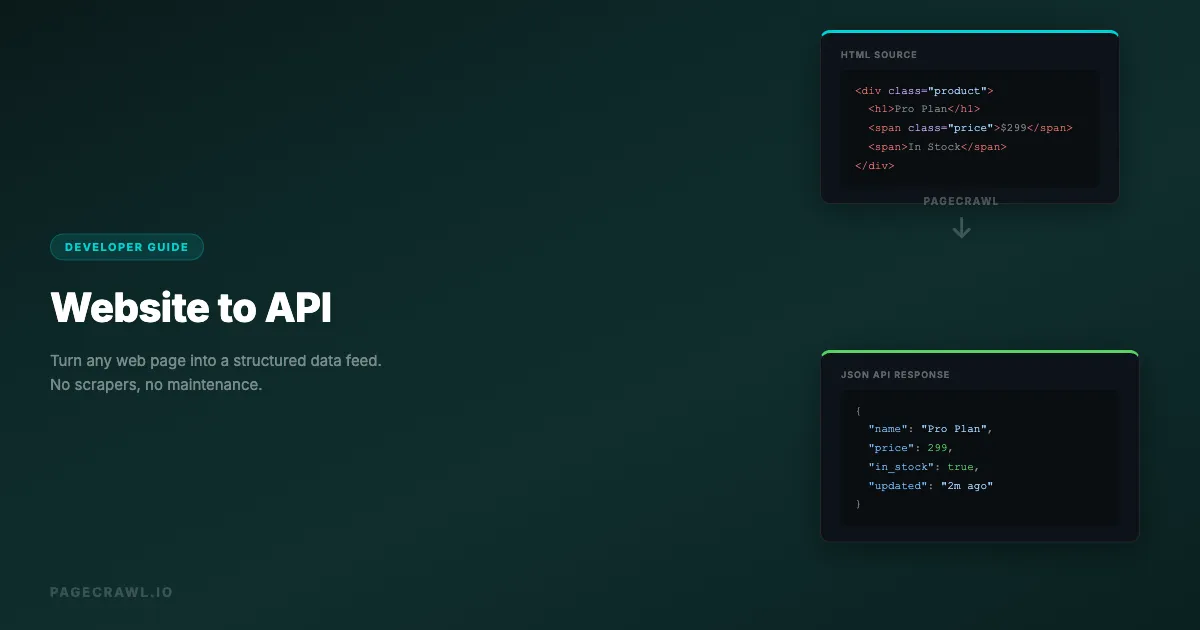
There is a third approach: use a web monitoring tool as an API layer. Set up monitors on the pages you need data from, configure element-specific extraction, and use webhooks to receive structured data whenever the page changes. You get a reliable data feed without building or maintaining scrapers.
This guide shows you how to build this pattern step by step.
Why do traditional web scrapers break?
Scrapers break because they depend on markup that the target site is free to change at any time, and because nothing tells you when it happens. Add bot detection, the infrastructure needed to run browsers at scale, and shifting legal boundaries, and a scraper becomes a maintenance project rather than a data source.
Scrapers Break Constantly
Every time the target website updates its design, your scraper breaks. A CSS class name changes, a div wrapper gets added, a table becomes a card layout. You do not get notified when this happens. You discover it when your data pipeline stops delivering data or starts delivering garbage.
Anti-Bot Measures
Websites increasingly deploy anti-bot technology: CAPTCHAs, rate limiting, IP blocking, JavaScript challenges, and browser fingerprinting. A scraper that works today may get blocked tomorrow.
Infrastructure Burden
Running scrapers at scale requires browser instances (for JavaScript-rendered pages), proxy rotation, job scheduling, error handling, retry logic, and monitoring. This is an entire infrastructure project.
Legal Complexity
Web scraping exists in a legal gray area. Terms of service often prohibit automated access. The boundary between acceptable data collection and unauthorized access continues to shift.
How does web monitoring work as a data extraction layer?
A monitor already does most of what a scraper does: it loads the page in a real browser, extracts the elements you selected, runs on a schedule, and detects when the value changed. Point its webhook at your application and you have a managed extraction pipeline:
- Browser rendering: Tools like PageCrawl use a full browser engine to render pages, handling JavaScript, SPAs, and dynamic content.
- Reliable access: Monitoring tools absorb the reliability work (rendering, retries, failed loads) so you do not maintain that infrastructure yourself.
- Scheduled execution: Checks run automatically on your configured schedule.
- Change detection: You only get data when something actually changes, reducing noise.
- Element extraction: Target specific page elements using CSS selectors.
- Structured output: Webhooks deliver JSON payloads with extracted data.
The key insight: a web monitor configured with element-specific tracking and webhook output is functionally equivalent to a managed web scraping API.
How does the pipeline fit together?
The page is the source, the monitor is the extractor, and the webhook is the transport into your systems. Here is the architecture:
Website Page -> PageCrawl Monitor -> Webhook -> Your Application
                (checks on schedule,    (JSON payload with
extracts elements) extracted data)- Configure a monitor on the target URL with element-specific tracking
- Select the data elements you want using CSS selectors
- Set the check frequency based on how fresh you need the data
- Configure a webhook to receive the extracted data
- Process the webhook payload in your application
Every time the monitored page changes, you receive a structured webhook with the new data. Your application processes it like any other API response.
Step-by-Step: Building a Website-to-API Pipeline
Let's walk through a concrete example: extracting product pricing data from a competitor's catalog page, which is the most common starting point for competitive intelligence monitoring.

Step 1: Identify the Data You Need
Visit the target page and identify the specific elements containing the data you want:
- Product name: Inside an
h1.product-titleelement - Price: Inside a
span.price-amountelement - Availability: Text in a
div.stock-statuselement - Last updated: A
span.update-dateelement
Use your browser's developer tools (right-click, Inspect) to find reliable CSS selectors for each element, or skip selectors entirely and describe the value you want in plain English with Parse. For help picking selectors that will not break, check our CSS selector guide for web monitoring.
Step 2: Create the Monitor
In PageCrawl, create a new monitor:
- Enter the target URL
- Select "Element" tracking mode
- Enter the CSS selector for the primary data element
- Set check frequency (e.g., every 6 hours)
- Enable screenshots for visual verification
For multiple data points from the same page, you have two approaches:
Approach A: Multiple monitors, one per element Create a separate monitor for each data point. Each extracts a specific element and sends its own webhook. This gives you granular change detection (you know exactly which field changed).
Approach B: Single monitor with a container selector
Use a CSS selector that captures a container element holding all the data you need (e.g., div.product-info). The webhook payload includes the full text content of the container, which you parse in your application.
Approach B is simpler to set up but requires more parsing on your end. Approach A is cleaner but uses more monitors.
Step 3: Configure the Webhook
Set up a webhook endpoint that will receive the extracted data. The help centre documents the payload shape and delivery behaviour in webhook integration: send change data to any external service.
// Express.js webhook handler
const express = require('express');
const app = express();

app.post('/webhook/product-data', express.json(), (req, res) => {
  const { page, contents, previous_check, short_summary, changed_at, page_screenshot_image } =
    req.body;

  // Extract the structured data from the change
  const productData = {
    url: page.url,
    name: page.name,
    extractedText: contents,
    previousText: previous_check ? previous_check.contents : null,
    summary: short_summary,
    checkedAt: changed_at,
    screenshotUrl: page_screenshot_image
  };

  // Store in your database
  saveProductData(productData);

  // Respond to acknowledge receipt
  res.status(200).json({ received: true });
});
Step 4: Parse and Store the Data
The webhook payload contains the extracted text content. Parse it into structured fields:
import re
import json

def parse_product_data(webhook_payload):
    text = webhook_payload.get('contents') or ''

    # Parse the extracted text into structured fields
    # This depends on the format of the target page
    lines = text.strip().split('\n')

    product = {
        'url': webhook_payload['page']['url'],
        'name': lines[0] if len(lines) > 0 else None,
        'price': extract_price(text),
        'in_stock': 'in stock' in text.lower(),
        'checked_at': webhook_payload['changed_at']
    }

    return product

def extract_price(text):
    """Extract price from text using regex"""
    match = re.search(r'\$[\d,]+\.?\d*', text)
    return float(match.group().replace('$', '').replace(',', '')) if match else None
Step 5: Build Your API Endpoint
Create an API endpoint that serves the stored data:
from flask import Flask, jsonify

app = Flask(__name__)

@app.route('/api/products/<product_id>')
def get_product(product_id):
    product = db.get_product(product_id)
    return jsonify({
        'name': product['name'],
        'price': product['price'],
        'in_stock': product['in_stock'],
        'last_checked': product['checked_at'],
        'source_url': product['url']
    })

@app.route('/api/products')
def list_products():
    products = db.get_all_products()
    return jsonify(products)
You now have an API that serves structured data extracted from web pages, updated automatically whenever the source pages change. To visualize and manage this data at scale, consider building a custom monitoring dashboard with the PageCrawl API.
Advanced Patterns
Multi-Page Data Aggregation
Monitor multiple pages and aggregate the data into a single dataset:
Page A (slack.com/pricing) -> Monitor A -> Webhook -> Your DB
Page B (notion.com/pricing) -> Monitor B -> Webhook -> Your DB
Page C (linear.app/pricing) -> Monitor C -> Webhook -> Your DB

Your API -> Serves aggregated pricing data from all three
This creates a multi-source data API from websites that have no API of their own.
Change-Triggered Actions
Instead of just storing data, trigger actions when specific changes occur:
def handle_webhook(payload):
    product = parse_product_data(payload)

    # Store the data
    db.upsert_product(product)

    # Check for actionable changes
    previous = db.get_previous_version(product['url'])

    if previous and product['price'] < previous['price']:
        # Price dropped - trigger alert
        send_slack_alert(f"Price drop: {product['name']} "
                        f"${previous['price']} -> ${product['price']}")

    if previous and not previous['in_stock'] and product['in_stock']:
        # Item back in stock - trigger notification
        send_push_notification(f"{product['name']} is back in stock!")
Scheduled Enrichment
Combine monitored data with other data sources:
- Web monitor extracts raw product data from a website
- Webhook delivers the data to your pipeline
- Pipeline enriches it with data from actual APIs (reviews from an API, shipping costs from another)
- Combined data is served through your API
Historical Data Storage
Store every version of the extracted data to build historical datasets:
def store_with_history(product):
    # Store current version
    db.products.upsert(product)

    # Store historical snapshot
    db.product_history.insert({
        **product,
        'snapshot_at': datetime.utcnow()
    })
Over time, you build a historical dataset of information that was never meant to be accessible via API.
Using Automation Platforms as Middleware
If you do not want to build a custom webhook handler, use an automation platform such as n8n, Zapier, or Make as middleware between PageCrawl and your data store. If you would rather write the handler yourself, the reference implementations in Python, Node.js, and PHP cover polling the API and verifying webhook signatures.
n8n Workflow
- Webhook trigger: Receives the PageCrawl payload
- Code node: Parses the extracted text into structured fields
- Google Sheets node: Appends a row with the structured data
- Optional: Slack notification when data changes
This gives you a "website to spreadsheet" pipeline with no coding required.
Zapier/Make Workflow
- Webhook trigger: Catches the PageCrawl payload
- Formatter: Extracts specific text using regex or string operations
- Airtable/Google Sheets: Stores the structured data
- Filter: Only process if specific conditions are met
Real-World Use Cases
Real Estate Listing Monitor
A property investment firm monitors real estate listing pages that do not offer API access:
- Setup: 200 monitors on listing pages across 5 real estate portals
- Extraction: Price, square footage, location, listing status
- Webhook pipeline: Data flows to PostgreSQL via a custom endpoint
- API: Internal team queries the aggregated listing data through a REST API
- Result: Real-time visibility into 200 properties across portals that have no API
Regulatory Filing Tracker
A compliance team monitors government portals for new filings:
- Setup: 30 monitors on regulatory database search result pages
- Extraction: Filing number, date, summary, filing party
- Webhook pipeline: n8n workflow parses and stores filings
- Notification: Slack alert when a new filing appears
- Result: Same-day awareness of regulatory filings that previously took weeks to discover
Job Market Intelligence
A recruiting firm monitors career pages of target companies for new and removed job listings:
- Setup: 100 monitors on careers/jobs pages
- Extraction: Job titles, departments, locations, posting dates
- Webhook pipeline: Data stored in Airtable via Zapier
- Dashboard: Airtable views show hiring trends by company, function, and region
- Result: Predictive intelligence about which companies are scaling which teams
Product Catalog Sync
An e-commerce aggregator monitors supplier catalogs:
- Setup: 500 monitors on supplier product pages
- Extraction: Product name, price, SKU, availability
- Webhook pipeline: Custom API ingests updates into the product database
- Automation: Price changes trigger automatic listing updates on the aggregator site
- Result: Supplier catalog data stays in sync without manual updates or fragile scrapers
Best Practices
Use Stable CSS Selectors
Choose selectors that are unlikely to change when the site updates its design:
- Good:
input[name="price"],#product-title,[data-testid="price"] - Okay:
.product-info .price,main article h1 - Bad:
.css-1a2b3c,div:nth-child(3) > span,.sc-dAlyuH
Auto-generated class names (like those from CSS-in-JS frameworks) change on every build. Prefer IDs, data attributes, and semantic selectors.
Set Appropriate Check Frequencies
Match the check frequency to how often the data actually changes:
- Pricing data: Every 2-6 hours (prices change frequently)
- Product catalogs: Daily (catalog updates are usually batched)
- Job listings: Daily (new postings typically go up during business hours)
- Regulatory filings: Every 6-12 hours (filings post on a schedule)
- Event listings: Daily to weekly (events are published well in advance)
Checking more often than the data changes wastes resources without adding value.
Handle Missing Data Gracefully
The target page will sometimes fail to load, change its structure, or remove content. Your webhook handler should handle these cases:
def handle_webhook(payload):
    try:
        product = parse_product_data(payload)
    except ParsingError as e:
        # Log the error but do not crash
        log.warning(f"Failed to parse data from {payload['page']['url']}: {e}")
        # Alert if this is recurring
        alert_if_repeated(payload['page']['id'], e)
        return

    if not product.get('price'):
        # Missing price - page may have changed structure
        log.warning(f"No price found for {product['url']}")
        return

    db.upsert_product(product)
Monitor Your Monitors
Set up alerts for monitor failures. If a monitor consistently fails (returns errors or empty content), the target page may have changed its structure or blocked access. PageCrawl tracks consecutive failures and can alert you when a monitor needs attention.
Version Your Parsing Logic
When the target page changes its structure, you will need to update your parsing logic. Version your parsers so you can roll back if needed:
PARSERS = {
    'v1': parse_product_v1,  # Original format
    'v2': parse_product_v2,  # After site redesign March 2026
}

def parse_product_data(payload, version='v2'):
    parser = PARSERS.get(version, PARSERS['v2'])
    return parser(payload)
Is monitoring-as-API better than a custom scraper?
For most teams, yes. Monitoring gets you rendering, scheduling, change detection, and delivery on day one, and the ongoing work is limited to updating a selector when a site redesigns. A custom scraper only wins when you need sub-minute frequency or extraction logic that must live inside your own codebase.
| Aspect | Web Monitoring API | Custom Scraper |
|---|---|---|
| Setup time | Minutes | Hours to days |
| Maintenance | Minimal (update selectors when site changes) | High (fix breakages, update logic) |
| Browser rendering | Built-in | Must configure and host yourself |
| Reliable access to protected pages | Built-in | Must implement |
| Scheduling | Built-in | Must implement (cron, queue) |
| Change detection | Built-in | Must implement |
| AI summaries | Available | Must implement |
| Cost per page | Included in plan pricing | Server + development time |
| Scale | Hundreds to thousands of pages | Limited by infrastructure |
For most use cases, the monitoring approach is faster to set up, cheaper to maintain, and more reliable than custom scrapers. Custom scrapers make sense when you need very high-frequency data (every minute) or very complex extraction logic that you prefer to run inside your own codebase.
Choosing your PageCrawl plan
PageCrawl's Free plan lets you monitor 6 pages with 220 checks per month, which is enough to validate the approach on your most critical pages. Most teams graduate to a paid plan once they see the value.
| Plan | Price | Pages | Checks / month | Frequency |
|---|---|---|---|---|
| Free | $0 | 6 | 220 | every 60 min |
| Standard | $8/mo or $80/yr | 100 | 15,000 | every 15 min |
| Enterprise | $30/mo or $300/yr | 500 | 100,000 | every 5 min |
| Ultimate | $99/mo or $999/yr | 1,000 | 100,000 | every 2 min |
Annual billing saves two months across every paid tier. Enterprise and Ultimate scale up to 100x if you need thousands of pages or multi-team access.
Compared to writing and maintaining a custom scraper, Standard at $80/year pays for itself before you finish the first debugging session. 100 monitored pages covers the changelogs, API references, pricing pages, and partner portals that your projects depend on, with webhooks delivering structured element data on every change. Enterprise at $300/year adds 500 pages, 5-minute frequency, and other advanced features for teams that need scale. All plans include the PageCrawl MCP Server, which plugs directly into Claude, Cursor, and other MCP-compatible tools. Instead of polling alert emails, developers can ask "what changed in the Stripe API docs this week?" and pull the answer from their own monitoring history, treating tracked pages as a living data source rather than a notification firehose. AI assistants can create monitors through conversation on every plan, including Free.
Getting Started
Pick one website you currently scrape manually or want to extract data from. Set up a monitor targeting the specific elements you need. Configure a webhook to receive the extracted data. Run it for a week and compare the data quality and reliability against your current approach.
PageCrawl's free tier gives you 6 monitors with webhook support, enough to prototype a data extraction pipeline before committing to a paid plan. Start building your first website-to-API pipeline today.