Picture an ordinary supervisory inspection. The inspector asks the controller to walk through its Records of Processing Activities (ROPA) entry for its primary CRM. The ROPA lists three sub-processors and states that no transfers occur outside the EEA. Since that entry was last touched, two of the three sub-processors have been replaced, a fourth has been added, and one of the new ones operates from a non-EEA jurisdiction. None of it is reflected in the record. The inspector notes the inaccuracy, and the controller now has to demonstrate continuous monitoring procedures going forward. This is the ordinary failure mode of ROPA maintenance, not an exotic one.
GDPR Article 30 requires every controller and processor (with limited exceptions for organizations under 250 employees) to maintain a Record of Processing Activities. Article 30(1) lists what controllers must record; Article 30(2) lists what processors must record. The list includes the categories of personal data, the categories of recipients (including those in third countries), the international transfer mechanisms relied on, the retention periods, and a general description of the technical and organizational measures.
The ROPA is one of the first documents a supervisory authority asks for. It is also the document that ages most rapidly. Controller and processor relationships shift continuously. Sub-processor lists change. Cross-border transfer mechanisms get amended after court decisions (Schrems II, the EU-US Data Privacy Framework, the SCC modules). Any one of these changes can render the ROPA inaccurate, and an inaccurate ROPA is a discrete violation under Article 30.
This guide covers what Article 30 actually requires, where the operational pain sits, what to monitor across processor and sub-processor sources to keep the ROPA current, and how to set up the monitoring tooling so the ROPA does not drift between annual reviews.
What does GDPR Article 30 actually require?
Article 30 requires a written (including electronic) record of every processing activity, held by both controllers and processors, made available to the supervisory authority on request. The article is short but prescriptive: each entry must carry a defined set of fields, and the record has to stay accurate, not merely exist. Always confirm the current wording against the official text of the Regulation and any guidance from your own supervisory authority; this article is informational, not legal advice.
Article 30(1) for controllers
For each processing activity, the controller's record must include:
- The name and contact details of the controller and any joint controllers, the controller's representative, and the data protection officer
- The purposes of the processing
- A description of the categories of data subjects and personal data
- The categories of recipients to whom the personal data have been or will be disclosed, including recipients in third countries or international organizations
- Where applicable, transfers to a third country, including the identification of that third country and the documentation of suitable safeguards
- Where possible, the envisaged time limits for erasure of the different categories of data
- Where possible, a general description of the technical and organizational security measures referred to in Article 32(1)
Article 30(2) for processors
Processors maintain a similar but less extensive record covering each category of processing activity carried out on behalf of a controller. The record must include the controller's identity, the categories of processing, and (where applicable) third-country transfers and safeguards.
What "categories of recipients" really means
Most controllers initially populate the ROPA with primary processors (the SaaS vendors they have contracts with). Processors are recipients in their own right. Sub-processors, by contrast, are typically not listed by name in the ROPA, but the categories of recipients must be accurate enough that a data subject can understand who the data flows to.
In practice, supervisory authorities expect controllers to know who their processors' sub-processors are, even if the ROPA does not enumerate them. When a processor changes sub-processors, the controller needs to know, evaluate the change against the contractual notification clauses, and update the ROPA if a category of recipient or third-country transfer is materially changed.
Why the ROPA ages so fast
Three operational realities make the ROPA a continuously decaying record:
Sub-processor turnover. Most major SaaS providers update their sub-processor lists multiple times per year. Each update can change which third countries data flows to, which categories of recipients exist, and what safeguards apply.
Transfer mechanism evolution. SCC versions get superseded. New adequacy decisions get added (and old ones get revisited). The EU-US Data Privacy Framework supplements (does not replace) SCCs for US transfers. Organizations relying on specific transfer mechanisms need to track when those mechanisms shift.
Technical and organizational measure changes. Article 30 requires a general description of TOMs. When a processor changes its TOMs (loses a certification, changes encryption defaults, restructures access controls), the ROPA description may need to be updated.

What should you monitor to keep the ROPA current?
Monitor four families of sources: each processor's published sub-processor list, each processor's DPA and standard contractual terms, the trust portals that carry certification status, and the regulator pages that govern transfers. The bulk of the monitoring obligation lives on processor and sub-processor websites. The supplementary monitoring sits with regulators and standards bodies that issue transfer-mechanism guidance.
Processor sub-processor lists
Every major SaaS processor publishes a sub-processor list. The discipline is to monitor every list for every processor that handles personal data on the controller's behalf.
Examples include:
- AWS: aws.amazon.com/legal/sub-processors
- Microsoft: microsoft.com/licensing/docs/customeragreement (sub-processor disclosures attached)
- Google Cloud: cloud.google.com/terms/subprocessors
- Salesforce: salesforce.com/company/legal/agreements
- Stripe: stripe.com/legal/ssa
- HubSpot: hubspot.com/data-privacy/security-and-compliance
- Snowflake: snowflake.com/legal/customer-trust
- Datadog: datadoghq.com/legal/data-processing-addendum
- OneTrust: onetrust.com/dpa
- Mailchimp / Intuit: mailchimp.com/legal/dpa
- Atlassian: atlassian.com/legal/sub-processors
- Slack: slack.com/trust/data-management
A change to any of these directly affects the controller's ROPA accuracy.
Processor DPAs and contractual terms
DPAs themselves change. Processors update standard DPA terms in response to regulator guidance, court decisions, and operational changes. A material DPA amendment that affects sub-processor governance, audit rights, or transfer mechanisms can affect the ROPA's "safeguards" entry, which is why legal and policy change tracking belongs on every processor's legal page. Our walkthrough on monitoring terms of service and privacy policy pages for compliance covers how to target the clause-bearing part of a long legal page instead of the whole document.
Trust portals and certifications
ISO 27001, SOC 2 Type II, ISO 27701, HIPAA, and other certifications referenced in the TOM section of the ROPA may be claimed on a processor's trust portal. Loss of a certification, change in audit scope, or expiry of an attestation may need to be reflected.
EDPB and national supervisory authorities
Guidelines from the European Data Protection Board on Article 30 and on cross-border transfers shape supervisory expectations, and the EDPB updates them regularly. National enforcement decisions, including those published by France's CNIL and Ireland's Data Protection Commission, further shape the practical interpretation of Article 30.
Pages worth tracking:
- EDPB: edpb.europa.eu, particularly the guidelines page and the public consultation responses
- CNIL: cnil.fr, particularly the GDPR sanctions page and the international transfers section
- DPC Ireland: dataprotection.ie, particularly enforcement decisions
- BfDI: bfdi.bund.de, particularly published positions on sub-processor management
- Garante (Italy): garanteprivacy.it, particularly the international transfers and sub-processor enforcement
Adequacy and transfer mechanism updates
European Commission adequacy decisions get added, revisited, and (in rare cases) revoked. Standard Contractual Clauses get superseded. The EU-US Data Privacy Framework adequacy decision is reviewed periodically. Each of these shifts can affect ROPA entries that reference specific safeguards.
The adequacy decisions page published by the European Commission is the canonical source. The Commission also publishes news on adequacy reviews, which precedes formal updates.
Setting Up ROPA Monitoring
The pattern that scales for a privacy and DPO function is a continuous monitoring system that watches every processor's sub-processor list, every relevant DPA page, and the EDPB and supervisory authority pages, then routes alerts to the privacy team.

Build the inventory
Start with the ROPA itself. Every processor in the ROPA is a monitoring target. For each processor, identify the sub-processor list URL, the DPA URL, the trust portal URL, and any other page that affects the ROPA accuracy. Tag each as vendor:{name} and by artefact type (subprocessor, dpa, trust).
Add the EDPB guidelines page, the relevant national DPA enforcement pages (for the jurisdictions you operate in), and the European Commission adequacy decisions page. Tag as regulator:edpb, regulator:cnil, etc.
Set capture frequency by criticality
Critical processors (the ones handling sensitive categories or high-volume processing): sub-processor list checked daily, DPA checked daily, trust portal weekly. Standard processors: weekly across the board. Regulator pages: daily for active enforcement, weekly for guidance.
Tell PageCrawl what your data flows look like
Workspace instructions describe the controller's data-flow profile: business sectors, data subject categories, sensitive processing operations, jurisdictions, transfer mechanisms relied on. The same Stripe SSA update produces different briefs for a regulated payments controller than for a basic e-commerce controller.
Route to privacy and security
Sub-processor list changes, DPA amendments, and trust portal changes route to the DPO and privacy team. Certification expirations route to the security team. Regulator guidance and enforcement route to the privacy team and legal counsel. Per-tag default channels keep the routing declarative.
Maintain the change history per processor
Every detected change is timestamped with before/after snapshots. For each processor in the ROPA, the change history is a continuous record of what the processor has changed in its operational posture. During a supervisory inspection, the change history is the evidence that the controller acted on detected changes promptly. Our guide to packaging an audit trail for a regulator shows how to assemble that history into an evidence bundle an inspector can open without a PageCrawl account.
PageCrawl's audit-ready web archives, available on request, are captured as WACZ files with multiple independent cryptographic attestations: an embedded WACZ Auth signature plus three sidecar timestamp proofs (an OpenTimestamps Bitcoin anchor and two RFC 3161 timestamps from independent commercial Trust Service Providers). When a DPA inspection asks "when did your processor add this sub-processor and when did your ROPA reflect it", the answer is the timestamp on the archive, attested by parties the controller does not control. For controllers that need EU statutory legal presumption under Regulation 910/2014 Article 41(2), eIDAS qualified timestamps from a Qualified Trust Service Provider are available as a Custom plan add-on; contact sales to scope.
The AI fabrication problem
In 2026 a generative model can produce a plausible screenshot of any processor's sub-processor page or DPA in seconds. A self-stored screenshot proves nothing to a supervisory authority because the controller could have generated it after the fact. What AI cannot fabricate is a hash anchored to the Bitcoin blockchain, an RFC 3161 timestamp signed by a Trust Service Provider's private key, or a qualified seal from a regulated QTSP. With audit-ready archiving enabled, PageCrawl attaches several of these in parallel on every detected change. The archive's existence at a specific moment is attested by parties the controller does not control, which is the only practical evidentiary standard for ROPA-supporting records in an AI-saturated world.
A Worked Example: Sub-Processor Addition at a Critical SaaS
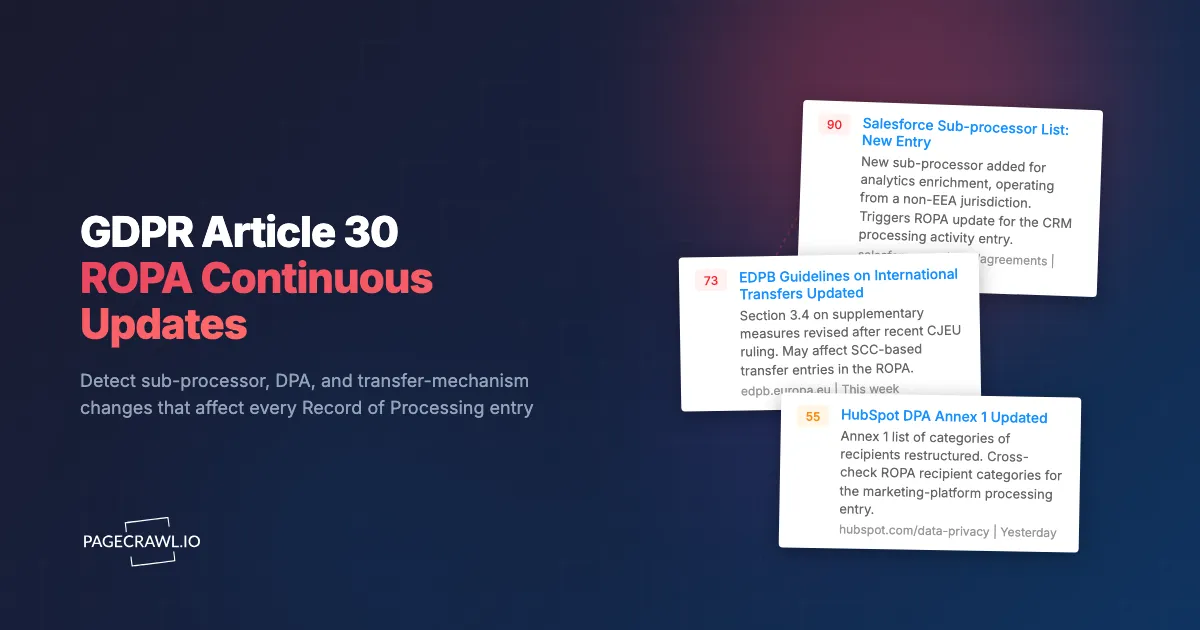
A common pattern: a primary CRM processor adds a new sub-processor for AI-driven enrichment. The sub-processor operates from a non-EEA jurisdiction. The notice goes live on the processor's sub-processor page on a Tuesday morning, with no prior email notification. The DPA between the controller and the processor specifies a 30-day customer notification period before the new sub-processor begins processing.
Without continuous monitoring, the controller may not see the change until the next quarterly vendor review. By the time the change is reviewed and the ROPA updated, the 30-day notification window may have passed and processing may already be underway.
With continuous monitoring, the change is detected within hours. The AI summary highlights the new sub-processor, the jurisdiction, and the function. The privacy team:
- Checks the contractual notification clause to confirm the 30-day window
- Evaluates the new transfer to a non-EEA jurisdiction against the existing safeguards in the DPA
- Updates the ROPA entry for that processor to reflect the new category of recipient and the new third-country transfer
- If the change requires data subject re-notification under the privacy notice, escalates that to the privacy notice owner
The audit trail documents that the controller detected and acted on the change within days, not weeks.
What are the most common ROPA monitoring mistakes?
The five that surface repeatedly in inspections are annual-only reviews, watching only the largest processors, treating sub-processor lists as static reference documents, ignoring transfer-mechanism evolution, and keeping no link between a detected change and the ROPA entry it affects. Each one is fixable with process rather than headcount.
Annual ROPA reviews
Annual reviews mean the ROPA is wrong for most of the year. Continuous monitoring with spot updates as changes are detected is the only sustainable model. Annual reviews then verify that the spot updates are integrated correctly.
Watching only the major processors
The major processors (AWS, Microsoft, Google) typically have the most stable sub-processor lists. The smaller processors (vertical SaaS, niche tools, agency platforms) are where sub-processor turnover is fastest and where ROPA inaccuracies most commonly accumulate. Coverage has to extend across the long tail.
Treating sub-processor lists as static reference
Many privacy programs reference processor sub-processor lists at contracting time and never look back. This is the operational source of most ROPA decay. Continuous monitoring closes the gap.
Forgetting transfer mechanism evolution
SCC versions get updated. Adequacy decisions get reviewed. EU-US Data Privacy Framework reviews are scheduled. Each of these can change the safeguards entry in the ROPA. Tracking the European Commission adequacy page and the EDPB transfers page catches these.
No connection between detected change and ROPA entry
The monitoring system catches the change. The ROPA tool stores the record. If the two systems are not connected, the privacy team has to manually triage every detected change against the ROPA. The pattern that scales is to tag detected changes by ROPA entry and to expose the link from the change history to the ROPA tool.
Choosing your PageCrawl plan
PageCrawl's Free plan lets you monitor 6 pages with 220 checks per month, which is enough to validate the approach on your most critical pages. Most teams graduate to a paid plan once they see the value.
| Plan | Price | Pages | Checks / month | Frequency |
|---|---|---|---|---|
| Free | $0 | 6 | 220 | every 60 min |
| Standard | $8/mo or $80/yr | 100 | 15,000 | every 15 min |
| Enterprise | $30/mo or $300/yr | 500 | 100,000 | every 5 min |
| Ultimate | $99/mo or $999/yr | 1,000 | 100,000 | every 2 min |
Annual billing saves two months across every paid tier. Enterprise and Ultimate scale up to 100x if you need thousands of pages or multi-team access.
Compliance monitoring is the cheapest insurance you can buy. A single missed regulatory change can trigger fines in the tens or hundreds of thousands, not to mention the audit overhead of proving you did not see it coming. Enterprise at $300/year covers 500 regulatory pages with unlimited history and timestamped screenshots, which is usually exactly what an assessor wants to see. All plans include the PageCrawl MCP Server, so your compliance team can ask Claude to summarize every change to a specific regulation over the last quarter and pull the exact diff, turning your monitoring history into a queryable audit trail. AI assistants can create monitors through conversation on every plan, including Free. Standard at $80/year is enough to cover 100 pages across your primary regulatory bodies if your program is smaller.
Getting Started
Set up Article 30 monitoring in three steps:
- Inventory every processor in the ROPA. For each, capture the sub-processor list URL, the DPA URL, and the trust portal URL. Tag by vendor and artefact type.
- Add the EDPB and your supervisory authority pages for the jurisdictions you operate in. Tag as regulator pages with daily check frequency.
- Set workspace instructions describing your data-flow profile so AI summaries highlight changes that affect your specific ROPA entries, not generic privacy housekeeping.
For related reading, see DORA compliance monitoring, GDPR and CCPA change tracking, and SaaS sub-processor list monitoring.
If your team maintains ROPAs across several controllers or processors, the Regulatory Intelligence use case walks through the full setup, including workspace instructions, tag-level inheritance, and per-jurisdiction digest routing for privacy and DPO functions.