Tesla's inventory changes constantly. New and pre-owned vehicles appear and disappear within hours, especially popular configurations and discounted models. Like other sought-after items, a well-priced Model Y or a rare Cybertruck trim can sell before you even know it was listed. If you are not checking at the right time, someone else grabs the car you wanted.
PageCrawl.io monitors Tesla's inventory pages and sends you a notification when something changes. You pick the model, condition, trim, color, and location, and PageCrawl watches the page for you. It works across all Tesla models (Model 3, Model Y, Model S, Model X, and Cybertruck) in 46 countries. Tesla tracking in PageCrawl is purpose-built: it reads Tesla's own inventory data rather than scraping a fragile page layout, so vehicle-level alerts stay reliable in every one of those countries.
Quick Setup
Select your country, model, and condition below. For US buyers, you can set your zip code and expand "More Filters" to narrow by trim, exterior color, wheels, interior, and payment type. For other countries, the tool will link you directly to your local Tesla inventory page so you can set your filters there.
You can also switch to the "Paste URL" tab if you have already configured your search on Tesla's website and want to paste the URL directly.
Why does Tesla inventory move so fast?
Tesla does not work like a traditional dealership. There is no lot you can browse at your own pace. Tesla's online inventory is the lot, and it updates continuously as cars get allocated, sold, or moved between locations.
Pre-owned and demo Teslas are especially hard to catch. A well-priced Model 3 or Model Y can sell within hours of appearing online. By the time you see a Reddit post about a good deal, it is usually gone.
The official Tesla site also limits searches to a radius around your location. If you are flexible on where you pick up the car, you would need to manually search multiple zip codes or postal codes to see everything available. That gets old fast.
This is where automated stock availability monitoring helps. Instead of refreshing Tesla's inventory page throughout the day, you set up a monitor once and get notified when the next check picks up a change.
How much can you save on a demo or used Tesla?
We tracked Tesla inventory for three months across the US and Europe. Used Teslas offered the bigger saving: 4 in 10 had their price cut while still listed, typically by $1,600. Demo cars averaged about 3% below comparable new cars, but were not always cheaper.
| What we tracked | What we found |
|---|---|
| Used cars with a price cut while listed | 4 in 10 (40%) |
| Typical cut on a used Tesla (US) | $1,600 |
| Largest cuts we saw | 8 to 15% of the asking price |
| Demo cars (500+ miles) vs same new trim | 2.7% cheaper on average |
| Typical demo saving in the US | about $900 to $2,900 |
| New cars repriced while listed | none |
A few examples from the data: a 2021 Model Y Long Range in Canada dropped from $47,800 to $40,400 over 17 days, and a 2022 Model S in the US went from $51,000 to $46,700. In the US, demo Model Y Premium All-Wheel Drive cars were listed about $1,400 below new ones, and demo Cyberbeasts about $2,440 below.
Two practical takeaways. First, a used car you like at the wrong price is worth watching, since a cut is common and usually comes within days. Second, compare demo cars carefully: options such as wheels and interior can make a demo cost more than a new car with fewer extras. Each price cut and each newly listed car arrives as its own alert, so you can act before someone else does.
How do you set up Tesla inventory alerts?
Setup takes a couple of minutes: build your filtered Tesla search with the tool above (or paste an inventory URL you have already configured), open it in PageCrawl, pick a check frequency and notification channel, and save. Every check then compares Tesla's listings against the previous check and alerts you about added, removed, or repriced vehicles.
1. Choose Your Filters
Use the setup tool above to configure your search. There are two ways to set up your monitor. In short: pick Option A if you are buying in the US, and Option B anywhere else or whenever you have already fine-tuned a search on Tesla's site.
Option A: Use the filter builder (recommended for US)
- Select your country (defaults to United States)
- Pick your model (Model 3, Model Y, Model S, Model X, or Cybertruck) and condition (New or Pre-Owned)
- Enter your zip code
- Optionally expand "More Filters" to narrow by trim, exterior color, wheels, interior, payment type (Cash, Lease, or Finance), and sort order
- Click "Start Monitoring on PageCrawl"
Option B: Paste a Tesla URL (recommended for international users)
- Go to Tesla's inventory page for your country (the tool provides a direct link when you select a non-US country)
- Set all your filters on Tesla's site (model, condition, location, trim, color, wheels, mileage range, price range, etc.)
- Copy the URL from your browser
- Switch to the "Paste URL" tab and paste it

The URL will look something like:
https://www.tesla.com/inventory/new/my?arrangeby=plh&zip=90210&TRIM=MY_PR_AWD&PAINT=WHITEThis URL contains all your filter preferences. That is what PageCrawl will monitor.
Copy your own URL rather than editing this one by hand. Tesla changes its filter codes from
time to time (the paint code for white has been PPSW and is now WHITE), and a retired code
matches no cars at all, so a hand-edited URL can end up watching an empty search.
Note about price filtering: Tesla's price and payment range filters do not persist in the URL when you copy it. If you want to limit results by price, use the Max Price field in the setup tool. PageCrawl will automatically type your max price into Tesla's payment filter each time it checks the page.
2. Configure Your Monitor
After clicking "Start Monitoring," PageCrawl opens with your Tesla URL pre-filled. You can adjust these settings before saving:
- Check frequency: The tool starts at 15 minutes, and 5-minute checks give the best chance of catching a well-priced car before it sells. Each new match arrives as its own alert, with the trim, color and listed price, rather than waiting for a digest.
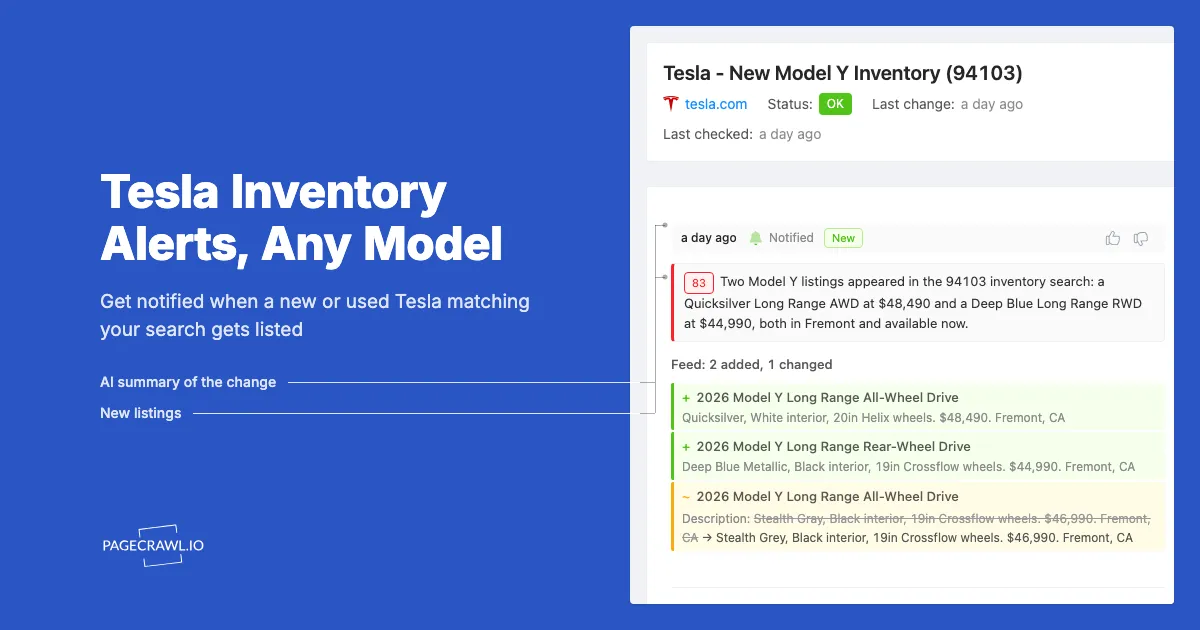
- Monitoring mode: Use "Feed" mode. PageCrawl detects individual vehicle cards on the page and tracks them as separate items, so alerts name the specific vehicles that were added or removed rather than saying "something changed". When you paste a Tesla inventory URL, PageCrawl auto-selects Feed mode for you, and the Feed Tracking Mode guide explains how added, removed, and changed items are reported.
- Narrow your filters: A monitor watches the first page of results Tesla returns for your search (around two dozen vehicles). If your search matches hundreds of cars, the ones you care about may sit beyond the first page and never trigger an alert. Add filters (trim, color, location, condition) so the vehicles you want fit near the top of the results.
- Notifications: Choose how you want to be alerted. Web push notifications, Telegram, Slack, and Discord are the quickest ways to see an alert once a check detects a change. Email works for less time-sensitive searches.
3. Get Notified
When new cars appear in your filtered results (or existing ones get removed or repriced), PageCrawl sends you a notification showing exactly what changed. You will see which vehicles were added or removed so you can act quickly.
Each notification includes the specific vehicle details that changed, so you do not need to go digging through the full inventory list to find what is new.
What You Can Track
New inventory. Monitor for new vehicles that match your preferred configuration. Useful when a specific trim, color, or wheel option is hard to find in your area. If you are waiting for a specific Model Y Long Range in Deep Blue, set up a monitor with those exact filters instead of checking manually every day.
Pre-owned and demo cars. These are where the savings are. In the listings we tracked, 4 in 10 used Teslas had their price cut while listed, and demo cars averaged about 3% below comparable new cars. Monitoring the pre-owned inventory page is the best way to catch deals before they are gone.
Cybertruck availability. Cybertruck inventory is still limited in many regions. Set up a monitor so you hear about new Cybertrucks appearing in your area, whether you are looking for the All-Wheel Drive or Cyberbeast trim.
Price drops. Tesla adjusts pricing on inventory vehicles. If a car you are watching drops in price, you will see the change in your notification. This is especially common with pre-owned vehicles and end-of-quarter inventory.
Multiple locations. Create separate monitors for different zip codes to expand your search radius beyond Tesla's default limit. Check San Francisco, Los Angeles, and Seattle simultaneously without manually switching between searches. This is particularly useful for less common configurations that may only appear in certain regions.
Multiple models. Set up one monitor per model and condition combination. Watch new Model Ys and pre-owned Model 3s at the same time with separate alerts for each. If you are cross-shopping between a Model Y and Model 3, running both monitors lets you compare what is available side by side.
Lease vs. purchase availability. Tesla's inventory pages let you filter by payment type. If you are specifically looking for lease-eligible vehicles, set the payment type to "Lease" in the tool's filter builder to only monitor vehicles available for lease.
International Tesla Monitoring
Tesla sells vehicles in dozens of countries, each with their own inventory page on Tesla's official website. The setup tool supports 46 countries across North America, Europe, Asia Pacific, and the Middle East.
For US buyers, the tool includes full filter options (zip code, trim, color, wheels, interior, payment type). For other countries, the tool generates a direct link to your local Tesla inventory page. Open the link, set your filters on Tesla's site, copy the URL, and paste it back into the tool.
Some examples of international Tesla inventory URLs:
- UK:
tesla.com/en_GB/inventory/new/my - Germany:
tesla.com/de_DE/inventory/used/m3 - Australia:
tesla.com/en_AU/inventory/new/my - Lithuania:
tesla.com/lt_LT/inventory/used/my
PageCrawl monitors these pages the same way it monitors US inventory, with country-level proxy locations available when a local Tesla site serves different content by region. You get the same feed-based tracking, the same notification channels, and the same check frequencies regardless of country.
Customize Filters With Actions
Some filters on Tesla's site do not save in the URL (like the price slider or mileage range). PageCrawl handles this with Actions, which let you interact with page elements before each check.
For example, you can add an action to type a value into the mileage filter, click a specific checkbox, or adjust a slider. Every time PageCrawl checks the page, it runs your actions first and then monitors the filtered results. The Max Price field in the setup tool uses this approach automatically, and the guide to automating browser interactions before monitoring lists every action type you can chain together.
Recommended Setup
For the best results, set up your Tesla inventory alerts like this:
| Setting | Recommendation |
|---|---|
| Check frequency | Every 15 minutes |
| Monitoring mode | Feed |
| Notifications | Web push, Telegram, or Slack for the fastest delivery |
| Filters | One monitor per model + condition combination, narrowed so your target cars fit the first page |
| Locations | Separate monitors for each zip code you want to watch |
If you are watching multiple models or locations, create a separate tracked page for each. This keeps notifications clear so you know exactly which search produced results. For example, you might have three monitors running:
- New Model Y Long Range in your local area
- Pre-owned Model 3 within 200 miles
- New Cybertruck anywhere in your state
How fast do Tesla inventory alerts arrive?
Alerts go out when a check detects a change, so speed depends on your check frequency. Paid plans can check every 15, 5, or even 2 minutes; the Free plan checks hourly. With 15-minute checks on a fast-moving pre-owned search, you will usually hear about a new listing before most buyers spot it manually.
Choosing Your PageCrawl Plan
PageCrawl's Free plan checks hourly, which is enough to test the approach on your top searches before committing. Paid plans unlock faster checks and more monitors:
| Plan | Price | Pages | Checks / month | Frequency |
|---|---|---|---|---|
| Standard | $8/mo or $80/yr | 100 | 15,000 | every 15 min |
| Enterprise | $30/mo or $300/yr | 500 | 100,000 | every 5 min |
| Ultimate | $99/mo or $999/yr | 1,000 | 100,000 | every 2 min |
Annual billing saves two months across every paid tier. Enterprise and Ultimate scale up if you need thousands of pages or multi-team access.
For most buyers, Standard at $80/year pays for itself the first time you catch a discounted pre-owned Tesla before it sells. In the listings we tracked, used Teslas were typically cut by $1,600 in the US while listed, and the best-priced cars go quickly. 100 monitored pages is enough to watch every model, condition, and region you care about simultaneously, with 15-minute checks giving you a real head start over anyone refreshing manually.
Getting Started
Start with one or two monitors for the model and condition you care about most. Run them for a few days to see how quickly Tesla's inventory turns over in your area. Once you see the pattern, expand to additional locations, models, or trim filters to cast a wider net.
PageCrawl's free plan includes enough checks to monitor several Tesla inventory pages at hourly intervals. If you need 15-minute checks or want to track more combinations, paid plans start at $8/month.