Craigslist is a treasure trove of opportunities, whether you're tracking job and career listings, an apartment to rent, or items to buy and sell. However, it can be time-consuming to keep refreshing the page in hopes of finding a hidden gem before someone else does. That's where Craigslist alerts come to the rescue. In this article, we will guide you on how to set up Craigslist alerts and get notified fast about new Craigslist posts using PageCrawl.io.
Streamlining Your Craigslist Experience with PageCrawl.io
PageCrawl.io monitors Craigslist search pages and alerts you when the next check detects new listings. Here is how to set it up in under two minutes:

1. Run your Craigslist search
Head to Craigslist, pick your city and category, and refine the results with any filters you need (price range, search terms, neighborhoods). Once you see the search results you want to track, copy the full URL from your browser's address bar.
Note: Some search refinements (the map or area view, and certain neighborhood toggles) may not persist in the copied URL. Before pasting, confirm that the filters you set actually appear in the address-bar URL, otherwise PageCrawl will track an unfiltered search.
2. Paste the URL into PageCrawl
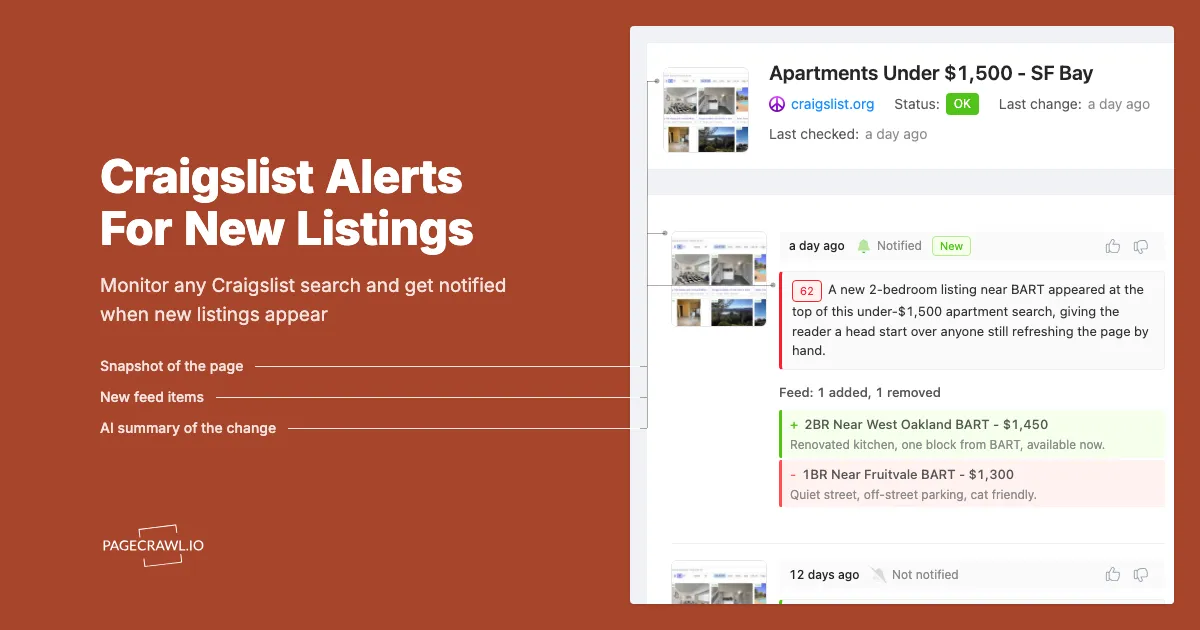
Sign up or log in to PageCrawl.io and paste your Craigslist URL into the new monitor form. PageCrawl automatically detects Craigslist and switches to Feed mode, which captures the listings on the first page of your search results (title, link, and price). The help centre article on feed tracking mode for structured item lists explains how additions and removals are detected. Craigslist defaults to newest-first, so the freshest listings appear at the top, which is exactly what you want for new-listing alerts. Note that PageCrawl sees the first page only and does not page through older results. You will see a preview of the listings found on the page.
3. Add keywords (optional)
If you only care about specific items, enter keywords in the Keywords field (for example: "iphone, macbook, standing desk"). PageCrawl will only notify you when a new listing matches at least one of your monitored keywords. Leave it blank to get notified about every new listing.
4. Pick your check frequency
Choose how often PageCrawl should check the page. Hourly is available on the free plan. Paid plans check more frequently (Standard every 15 minutes, Enterprise every 5 minutes), and 2-minute checks require the Ultimate plan specifically, so you can be among the first to respond to a new post.
5. Choose your notification channels
PageCrawl sends email notifications by default. You can also connect Slack, Discord, Telegram, Microsoft Teams, or webhooks from your workspace settings so alerts go wherever you need them.
6. Save and you are done
Click save and PageCrawl runs the first check straight away. From now on, each check compares the current listings against the previous check and tells you exactly which listings were added or removed, rather than sending a generic "page changed" alert.
How do you filter Craigslist alerts down to relevant listings?
Filter on three levels: add keywords to the monitor so only matching listings trigger an alert, tighten the Craigslist search URL itself before you paste it, and use feed rules to decide whether additions, removals, or price changes are worth a message. As you start receiving alerts, you might find that you are getting messages for listings you are not interested in. PageCrawl makes it easy to filter by keywords so you only hear about relevant listings:
- Add keywords in the setup tool. When setting up your monitor using the tool above, enter the keywords you care about (for example: "iphone, macbook, remote"). PageCrawl will only notify you when a new or removed listing matches one of those keywords.
- Use Craigslist's own filters too. Set a price range, choose a specific category, and add search terms directly in the Craigslist search bar before pasting the URL. The more specific the search URL, the fewer irrelevant listings you will see.
- Use feed rules for more control. In your monitor's Rules tab, you can choose to be notified only when new listings appear, only when listings are removed, or only when prices change. New and removed listing alerts are the primary, most reliable case for Craigslist; price-change tracking is a useful secondary option when a listing's price is updated. See notification conditions and filters for the full set of per-page rules.
With PageCrawl.io's Craigslist alerts and feed-level tracking, you can stay ahead of the curve when it comes to discovering Craigslist's hidden treasures. Say goodbye to manual page refreshes and hello to a smarter way of searching for opportunities on Craigslist. Give PageCrawl.io a try and experience the convenience of effortless Craigslist alerts.
How quickly will you hear about a new Craigslist listing?
You hear about a listing when the next scheduled check detects it, so the wait depends on your check frequency: up to an hour on the free plan, about 15 minutes on Standard, 5 minutes on Enterprise, and 2 minutes on Ultimate. For competitive apartment and furniture searches, which run on the same speed logic as real estate listing monitoring, a shorter interval is usually what decides whether you are first to reply.
Does Craigslist have its own alerts?
Craigslist lets you save a search while logged in and email you about matches, and that works fine for slow-moving categories. It covers one search per saved query on Craigslist's own schedule, with no keyword filtering across results, no Slack, Telegram, or webhook delivery, and no history of what was added or removed. Note that each Craigslist city site is separate, so a saved search only covers the one region you created it in.
Choosing your PageCrawl plan
PageCrawl's Free plan lets you monitor 6 pages with 220 checks per month, which is enough to validate the approach on your most critical pages. Most teams graduate to a paid plan once they see the value.
| Plan | Price | Pages | Checks / month | Frequency |
|---|---|---|---|---|
| Free | $0 | 6 | 220 | every 60 min |
| Standard | $8/mo or $80/yr | 100 | 15,000 | every 15 min |
| Enterprise | $30/mo or $300/yr | 500 | 100,000 | every 5 min |
| Ultimate | $99/mo or $999/yr | 1,000 | 100,000 | every 2 min |
Annual billing saves two months across every paid tier. Enterprise and Ultimate scale up to 100x if you need thousands of pages or multi-team access.
Standard at $80/year covers 100 saved searches and listing pages across every category and city you care about. If it helps you land one apartment, one used car, or one piece of furniture at a fair price before someone else does, it has paid for itself. The 15-minute check frequency means you see most new listings within a quarter-hour of posting, which is often the difference between a response that gets a reply and one that gets "already sold."